Shader by macius
Gallery Description FS25 Shader by macius Hello, I am giving you my private shaders along with the instructions. Shaders in the photo are on lighting by czarny317/ ENJOY THE GAME <33!! Credits maciusbalboa
Published: Apr 1, 2026
FS-Portal.euMod CatalogIn catalog
16,417
Farming Simulator versions
Mods
883 mods
Browse 883 FS25 mods in Useful things with direct links to each mod page.

Gallery Description FS25 Shader by macius Hello, I am giving you my private shaders along with the instructions. Shaders in the photo are on lighting by czarny317/ ENJOY THE GAME <33!! Credits maciusbalboa
Published: Apr 1, 2026

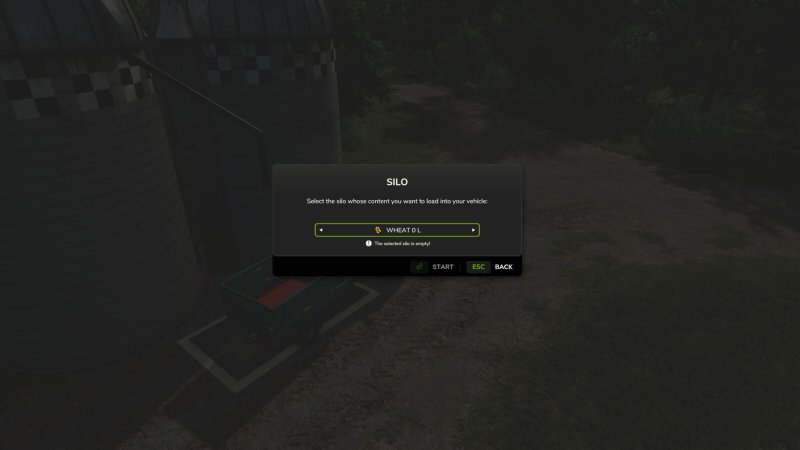
Gallery Description FS25 Trim Silo Dialog Tired of cycling through dozens of empty items just to find one item in your silo? This mod is for you. Applies a simple update to every silo or production dialog to hide any crops from the silo dialog with 0 quantity. Note: If the silo or production is completely empty, all items will still show 0 quantity. GitHub link: https://github.com/GMNGjoy/FS25_TrimSiloDialog Credits GMNGjoy
Published: Apr 1, 2026

Gallery Description FS25 Narrow Vines And Olives (2 And 2.50) A narrow set of vines and olive plants, spaced 2 and 2.50 meters instead of 3. It’s the sweet spot between spacing, letting place down more lines, and machines size. Grapes 2.50 and 2 meters, 25$ Olive 2.50 and 2 meters, 35$ Credits IllGib
Published: Mar 31, 2026

Gallery Description FS25 Crop Destruction Overhaul Crop Destruction Overhaul Take control of your impact on the field with a completely redesigned crop destruction system. This mod replaces the binary “On/Off” setting with a dynamic, physics-based approach that rewards precision and careful operation. Key Features: Speed-Based Destruction: Crop damage is no longer guaranteed. At “creeping” speeds (under 5 km/h), crops are preserved. As your speed increases, so does the probability of destruction, making high-speed turns or transit through fields a calculated risk. Footprint Matters: Destruction is calculated based on the actual physical contact area of your tires. Standard tires have a larger footprint and cause more damage, while narrower tires naturally minimize your impact. Care Wheel Integration: Vehicles fitted with specialized Narrow/Care Wheels receive a further 50% reduction in destruction probability. They are no longer “magic” invincibility shields; you must still watch your speed, but they offer the best protection for your yield. Persistent Realism: Once enabled, this mod takes full control of the crop destruction logic, overriding the standard game settings to ensure a consistent, realistic experience. Credits TommyNookah
Published: Mar 31, 2026

Gallery Description FS25 Honk To Open The Gates Are you tired of exiting the vehicles to open your gates? Did you ever wish you could just honk and someone else would open the gate for you? Well, now you can! This mod simulates gate and door opening/closing by honking your horn twice when in front of them. It works with any gate or door in game. Just drive straight up to the gate, honk twice and the gate will open or close! Supports multiplayer. Oh, and if you ever get annoyed by aligning your vehicle just right at the gate, you can use angry honking feature (instead of honking twice hold the horn for 3+ seconds) and gates should open even if your positioning is not perfect. Happy honking. Credits 50keda
Published: Mar 31, 2026

Gallery Description FS25 Litres To Tonnes Converter Litres → Weight Converter Automatically displays your cargo weight in real time in the HUD, as soon as you enter a loaded vehicle. Features: – Automatically switches to kg if the load is under 1 tonne – CTRL+U: cycle units tonnes → kg → lbs – Compatible with all mods that add new materials Controls: – CTRL+U: cycle unit (t / kg / lbs) Credits AgriKevolution
Published: Mar 31, 2026

Gallery Description FS25 GE10 Script - Traffic Manager (Prefab) Traffic Manager This comprehensive script for the GIANTS Editor 10 allows you to create, manage and debug complete traffic and pedestrian systems directly inside the editor. The Traffic Manager provides a wide range of tools for quickly setting up traffic splines, pedestrian paths and static characters, while also offering full control over all related XML data. The tool enables you to convert splines into traffic or pedestrian splines and automatically assign required attributes such as speed, density and group settings. Existing systems can be loaded, extended and fully edited, including group management, time schedules, conditions (e.g. seasons, weather) and sound configurations. A strong focus is placed on pedestrian management: Groups can be created, modified and removed. Pedestrians can be assigned to these groups individually or globally. In addition, static humans can be placed directly in the editor, organized within groups and visually debugged. The tool also supports moving entities between groups as well as automatic renaming and scene cleanup. For maximum clarity, the script includes extensive debug visualization directly in the viewport: Traffic splines, pedestrian paths, static humans, directions and bounding boxes are rendered in real time. This makes it easy to identify issues and understand system behavior without leaving the editor. This tool is designed for both beginners and advanced modders and significantly speeds up the creation of complex, lively maps. ____________________________________________________ Installation: 1. Navigate to the installation directory of the GIANTS Editor (e.g. “C:\Program Files\GIANTS Software\GIANTS_Editor_10.X.X\”). 2. Copy the file “TrafficManager.lua” and the folder “imgTrafficVehicles” from the prefab into the GIANTS Editor script folder. 3. Restart the GIANTS Editor. The script will then be available via the menu bar under “Scripts”. Credits Aslan
Published: Mar 31, 2026

Gallery Description FS25 GE10 Script - WaterToolkit (Prefab) WaterToolkit is a GIANTS Editor script for Farming Simulator 25 that significantly streamlines the workflow for creating and customizing water surfaces. Features: • Generate water planes from splines – both closed lake surfaces and rivers with adjustable width • Convert existing planes into complete water planes (including WaterSimulation & WaterInMirror) • Manage shader parameters via presets and apply them to any number of nodes at once • Built-in presets based on FS25 maps • Create, save, reorder and delete custom presets • Live preview with mesh triangulation directly in the viewport ____________________________________________________ Note – Height Slider Range: If the slider range for the water height is not sufficient, the limits can be adjusted directly in the script: WaterToolkit.HEIGHT_MIN_SLIDER (default: lower bound) WaterToolkit.HEIGHT_MAX_SLIDER (default: upper bound) ____________________________________________________ Installation: 1.) Navigate to the GIANTS Editor AppData path. Default: “C:\Users\[USER]\AppData\Local\GIANTS Editor 64bit 10.0.XX\scripts\” 2.) Copy the file “WaterToolkit.lua” from the prefab into the Script folder of the GIANTS Editor. 3.) The script will then be available in the GIANTS Editor via the menu bar under “Scripts”. Credits Aslan
Published: Mar 31, 2026

Gallery Description FS25 GE10 Script - SplineToolkit (Prefab) v2.0.1.0 The SplineToolkit is a comprehensive GIANTS Editor script that brings a wide range of spline-related tools together in a single package. Nearly all functions include a real-time preview directly in the editor viewport. — Base Tools — The Base Tools form the foundation of the toolkit and provide essential tools for spline and terrain editing. Spline points can be projected directly onto the terrain, shifted vertically or horizontally, and the terrain height can be precisely matched to the spline. In addition, terrain textures and foliage can be painted along a spline, and Resample Spline allows the number of control points to be adjusted as needed. — Place Objects — Place Objects allows objects to be placed flexibly along a spline or distributed across a defined area. Placement can be done sequentially in the order of the SourceObjects or randomly from the available selection. A wide range of parameters such as distance, height type, rotation and offset provide precise control over the result. — Place Fence — Place Fence enables fast and structured creation of fence systems along a spline, with a clear list of base game fences including preview images. Fences can be imported directly, and animated gates can be positioned along the spline using a slider. The animation data is automatically written to the configuration file so that gates work correctly in-game via a trigger. A built-in XML viewer and the “Validate Fences” function allow full verification of all entries for errors and inconsistencies. — Export as .OBJ — The export tool allows splines to be exported as .OBJ files using two different methods, optimizing the workflow between GIANTS Editor and Blender. Additional parameters control the density and format of the exported points. — Generate Street — The road generator allows complete road meshes to be created directly inside the GIANTS Editor, including correct UVs and a selection of base game road textures. A real-time preview displays the result immediately in the viewport before the mesh is finalized. Matching traffic splines can optionally be generated automatically. ____________________________________________________ Installation: 1.) Navigate to the GIANTS Editor AppData path. Default: “C:\Users\[USER]\AppData\Local\GIANTS Editor 64bit 10.0.XX\scripts\” 2.) Copy the file “SplineToolkit.lua” and the folder “imgFence”/”imgRoads” from the prefab into the Script folder of the GIANTS Editor. 3.) The script will then be available in the GIANTS Editor via the menu bar under “Scripts”. ____________________________________________________ Hotfix Update 2.0.1: – [Base Tools] = Clear Foliage now correctly clears all foliage layers. – [Base Tools] = Set Terrain Height: Fixed spike/gap artifacts. – [Base Tools] = Set Terrain Height: Configurable pixel resolution via SplineToolkit.TERRAIN_METER_PER_PIXEL_LOAD_FROM_MAP and SplineToolkit.TERRAIN_METER_PER_PIXEL_CUSTOM. Update 2.0: – [General] = A real-time preview has been integrated directly into the editor for nearly all tools. – [General] = Various minor bug fixes and general code optimizations applied. – [Base Tools] = SetTerrainHeight now reads the map’s pixel grid to ensure improved height adjustment when using a non-default map configuration. – [Place Objects] = Area mode completely rebuilt; the previous width algorithm has been removed and replaced with a significantly more precise approach. – [Place Objects] = Simplified UI: Two modes (Straight / Area) via radio buttons; Sequential vs. Random placement as a dedicated selection option. – [Place Fence] = Fences can now be imported directly, including automatic transfer of all animation data into the configuration file. – [Place Fence] = Gates can be positioned along the spline via a slider and are automatically registered as AnimatedObjects, allowing them to open normally via a trigger in-game. – [Place Fence] = Added pe
Published: Mar 31, 2026

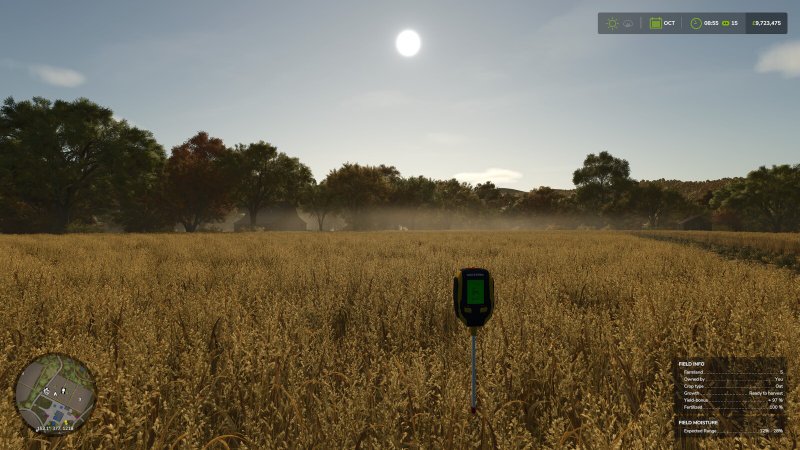
Gallery Description FS25 Moisture System v1.0.0.2 Moisture System Transform your farming experience with a sophisticated moisture simulation system that brings realism and strategic depth to Farming Simulator 25. This comprehensive mod introduces dynamic moisture mechanics that fundamentally change how you approach crop management, harvest timing, and storage decisions. Experience authentic environmental interactions where moisture levels fluctuate naturally across your farm based on terrain elevation, prevailing weather patterns (rainfall, snowfall, temperature fluctuations), and day/night cycles. Fields at lower elevations stay wetter while higher ground dries faster, so consider moisture levels when planning which crops to plant where and when to harvest. Every farming decision gains new weight as you balance optimal timing against changing conditions. Advanced Crop Quality System: Your harvested yields are no longer uniform commodities. Each load receives a quality grade from A (premium) through D (poor) based on its moisture content at harvest, with direct economic consequences at the point of sale. Every crop species has been carefully calibrated with unique optimal moisture windows that reflect real-world agricultural standards. Master these ranges and time your operations precisely to maximize profitability. Access comprehensive grade tables and seasonal moisture projections through the integrated in-game interface (Shift+M). Features: – Terrain-aware field moisture simulation with monthly variation patterns across three distinct environment profiles (Dry/Wet/Normal) – Sophisticated grass management system featuring progressive tedding mechanics, weather-responsive drying rates, and automatic hay conversion at optimal moisture thresholds. Multiple tedding passes accelerates drying if you need it. – Ground rot: Grass and straw piles left exposed accumulate rain exposure over time, triggering progressive volume loss as organic material deteriorates. Timing your collection and baling operations becomes critical. Hay will revert to grass if it gets too wet. – Bale rotting: Unprotected bales track cumulative rain exposure with initial tolerance periods, escalating decay rates based on exposure history, and limited recovery during dry spells. Strategic use of wrapping and shelter infrastructure protects your investment. – Purchase the moisture meter hand tool in the store for precise field and pile readings on demand (You can display this in the HUD if preferred). Extensive customization options allow you to calibrate moisture dynamics, tedding efficiency, decay parameters, and interface preferences to match your preferred gameplay experience. Whether you seek hardcore realism or a gentler introduction to moisture management, the system adapts to your vision. Github: https://github.com/sprkem/FS25_MoistureSystem Changelog: 1.0.0.2: – Rework events in multiplayer to reduce network traffic and subsequent issues. – Fix an issue with rotting bales in object storages in multiplayer. – Moisture and grade are now visible when harvesting on the fill HUD. – Fix sporadic issue where crop would sell for a very low price – Fix various other multiplayer issues – Add safety check to avoid an issue loading a game when there is a bale in a baler – Add Czech translation thanks to Kynuska – Add Polish translation thanks to KITT3000 Credits Ozz
Published: Mar 31, 2026