FS-Portal.euFS-Portal.euMod Catalog

In catalog

16,431

Farming Simulator versions

Mods

Categories

Useful things

883 mods

Browse 883 FS25 mods in Useful things with direct links to each mod page.

0
Universal Autoload

Universal Autoload

Gallery Description FS25 Universal Autoload v1.1.1.0 Autoloading specialisation for trailers. This automatically modifies the actual base game trailers, and will be applied to any new or existing trailers on your farm. Supported trailers can be configured with a GUI when purchasing in the shop. Please see the included read-me file for full instructions on configuration. Features: – Loads all pallet/container types – Loads lumber to forestry vehicles – Load and Unload by selected material or container type – Can also restrict loading to full pallets only – Select ‘ALL’ to load mixed types in sequence – Option to load in stacks or layers – Objects are loaded in size order for best packing efficiency – Integrated with AutoDrive and CoursePlay Changelog: v1.1.1.0 – Fixed a bug where multiple pallets could be created in the shop v1.1.0.0 – Added support for Highlands DLC – Added global setting to toggle physics for loaded pallets (default off) – Global settings can now be changed in MP by players with admin permission v1.0.1.0 – Prevented some runtime errors – Improved loading of shipping containers GitHub-Link: https://github.com/loki79uk/FS25_UniversalAutoload Credits loki_79

Published: Apr 5, 2026

Downloads: 0Ratings: no votes yet.
0
Ultra Realistic shader by draxen 15

Ultra Realistic shader by draxen 15

Gallery Description FS25 Ultra Realistic shader by draxen 15 This is my own custom ReShade preset for Farming Simulator 25. It is designed to look similar to Dnerdy Reshade, with improved lighting, colors, and overall realism. Important: – Set your in-game brightness to 0.9 for best results – DLSS Ultra settings recommended Requirements: – You must have ReShade installed Credits draxen 15

Published: Apr 5, 2026

Downloads: 0Ratings: no votes yet.
0
GianiShade ULTRAREALISM

GianiShade ULTRAREALISM

Gallery Description FS25 GianiShade ULTRAREALISM (FORWARD: I USE A CUSTOM ENVIRONMENT MADE BY @DNERDY I WILL ADD IT TO THE DL SOON!) I hereby publish my own shader preset, inspired by the well-known “dnerdy” look – but slightly adjusted and further developed to offer an even more pleasant visual experience. Features & Features • Natural colors – neither too bright nor too flat • Harmoniously coordinated overall picture • Stronger, more colorful display on vehicles and paintwork • No use of additional effects such as PPFX (SSDO) necessary • Easily compatible with DLSS & similar technologies • Supports upscaling without loss of quality • Smooth performance without stuttering Note The preset is optimized so that it is ready to use straight away – without complicated additional settings. Just install and enjoy! A NOTICE!!! After installing the shader, click on “Extensions” in the reshade menu and remove the tick once (with a mouse click) and then click on the second box from the top to render the shader at the respective graphics setting (1080p, 4k etc.). Have fun and kind regards, yours Gian1 Credits gian1

Published: Apr 5, 2026

Downloads: 0Ratings: no votes yet.
0
Lighting + Reshade + NV Filters + NV Panel Agro Wicher

Lighting + Reshade + NV Filters + NV Panel Agro Wicher

Gallery Description FS25 Lighting + Reshade + NV Filters + NV Panel Agro Wicher Hello, here are my current settings for FS25. 1. ReShade_Setup_6.7.3 2. Agro Wicher Preset 3. Lighting 4. NVIDIA Filters 5. Color Settings in the NVIDIA Panel Everything is sorted into folders. The entire configuration has been optimized to maintain a balance between image quality and smooth performance. Credits Agro Wicher Uploaded by agrowicher

Published: Apr 5, 2026

Downloads: 0Ratings: no votes yet.
0
Realistic FS25 Shader

Realistic FS25 Shader

Gallery Description FS25 Realistic FS25 Shader This is my own private ReShade preset for Farming Simulator 25. It improves: – Lighting – Colors – Overall realism Important: Brightness settings inside FS25 are very important for best results. Requirements: – You must have ReShade installed Credits LiamAndersson13

Published: Apr 3, 2026

Downloads: 0Ratings: no votes yet.
0
LIGHTING BY JACOO B

LIGHTING BY JACOO B

Gallery Description FS25 LIGHTING BY JACOO B Hey. I’m giving you my lighting. Replace the first two files. Installation folder / data / maps / mapEU/US / config Nividia settings – Sharpening +40/-50 – Sharpening 50/15 Enjoy :) Credits JACOO B Uploaded by JACOO B

Published: Apr 3, 2026

Downloads: 0Ratings: no votes yet.
0
More Motor Sounds

More Motor Sounds

Gallery Description FS25 More Motor Sounds This script allows you to configure an alternative engine sound for many vehicles. With the new “More Motor Sounds” configuration in the shop, you can choose different sounds from a large database. The available sounds vary depending on the vehicle model and include different engine sounds for 4-, 6-, and 8-cylinder engines. Some sounds also offer variants, for example with an integrated turbo, a blow-off valve, or an open pipe option. Please note: Blow-off sounds can only be selected in single-player mode! In the in-game shop, most sounds in the sound configuration are marked with stars. The stars mean: – Sounds with one star (*) are exclusive original sound recordings with model-specific adjustments. – Sounds with two stars (**) are Farming Dud’s prefab sounds with model-specific adjustments. – Sounds with three stars (***) are heavily modified GIANTS sounds with model-specific adjustments. – Sounds without stars are universal. They were created from the original recordings mentioned above and from the modified GIANTS sounds. The exclusive sounds of Farming Dud’s (FD) are original sound recordings that are only included in this mod. They are not available as prefabs elsewhere and have not been used directly in any other vehicle mods. Sounds from the FD exclusively for this mod (*): – MWM 226.4 (4-cylinder): Original recording of a naturally aspirated engine from a Fendt Farmer 308 – Perkins 1006-6T (6-cylinder): Original recording from a Massey Ferguson 6290 – MAN D0826 (6-cylinder): Original recording from a Fendt Favorit 824 – KHD BF6L913 (6-cylinder): Original recording from a Deutz DX 6.30 – Cummins 6BT (6-cylinder): Original recording from a Case 5150 Maxxum Sounds from the FD, which are also available as prefabs in the ModHub (**): – JD PowerTech TLA (6-cylinder): Original recording from a John Deere 6910 – JD PowerTech PVS (6-cylinder): Original recording from a John Deere 6155M – Mercedes Benz OM366 (6-cylinder): Original recording from an MB-trac 1300 – CASE IH DT-402 (6-cylinder): Original recording from a Case 1255 – KHD BF4L913T (4-cylinder): Original recording from a Deutz DX 4.70 – MWM 226.6B (6-cylinder): from a Renault TZ (Sound Prefab FS22) – MWM 226.6TD (6-cylinder): Straight pipe / open pipe from a Renault TZ – Perkins 1006-6T (6-cylinder): Straight pipe / open pipe original recording from a Massey Ferguson 6290 – MAN D0836 (6-cylinder): Sound from a Fendt 900 TMS (Sound Prefab FS22) The following sounds are heavily modified GIANTS sounds (***): – MAN LE 521 (6-cylinder) – Merlo, Deutz TCD 2012 L04 (4-cylinder) – FPT, Claas Axion (6-cylinder) – Deutz Agrostar 8.31 (6-cylinder) – JCB Fastrac 8000 Series (6-cylinder) – Volvo EC250 (6-cylinder) – Volvo LM841 (6-cylinder) – Volvo L120H (6-cylinder) – Volvo L180H (6-cylinder) Sounds that were created by combining existing sound recordings (no original recordings): – 6-cylinder sound for Ford/New Holland – 6-cylinder sound for trucks and Unimogs – 8-cylinder sound for the K700 Credits [MW]PeterAH + Farming Dud's - Vassili_K98

Published: Apr 2, 2026

Downloads: 0Ratings: no votes yet.
0
Attach Implements Manually

Attach Implements Manually

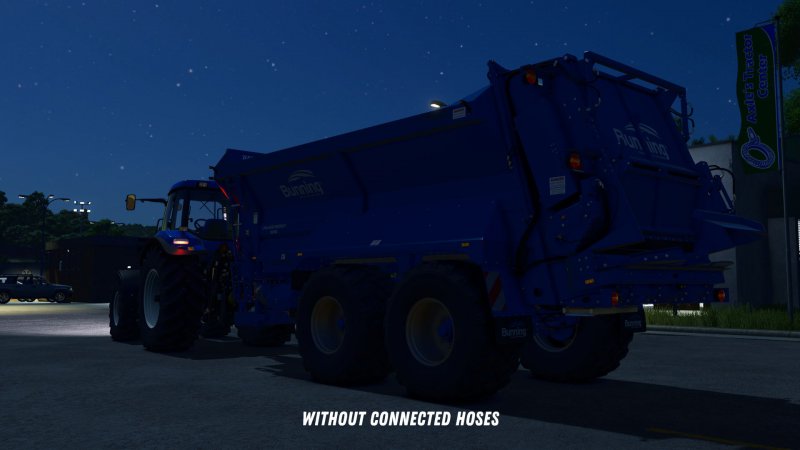
Gallery Description FS25 Attach Implements Manually v1.0.0.2 This mod allows you to manually attach implements to your tractor. In the general settings, you can choose whether attachments should be connected automatically or manually. If you opt for manual attachment, a message will appear when approaching an implement: “Exit vehicle to attach.” Once you’ve exited the vehicle and walked to the hitch, you can attach the implement by pressing Q. After that, you can manually connect the hydraulic hoses, air lines, and electric cables by pressing Y. The PTO shaft can be connected separately using the Z key. An exception applies to trailers and implements with a drawbar hitch and Semitrailer attacher: These will automatically attach as soon as you align the drawbar precisely with the implement’s hitch. Additionally, when purchasing front loaders, you can choose between different coupler types: – Manual: The front loader implement must be attached manually, as well as the hydraulic hoses. – Auto Locking: The front loader will automatically lock when approaching (if enabled in settings) or by pressing Q from the cab, but the hydraulic hoses must be connected manually. – Quick Coupler: The front loader will automatically lock when approaching (if enabled in settings) or by pressing Q from the cab, and the hydraulic hoses are also connected automatically. If manual attachment is enabled in the settings, you’ll need to manually connect the hoses after the implement is hitched. If it is disabled, all connections will be made automatically once the implement is attached. All key bindings can be customized freely in the settings. The default key for the “Attach” action uses the standard game assignment. Changelog 1.0.0.1: – Fixed issues with hook lift vehicles and BigBags. Changelog 1.0.0.2: – Fixed issues with skid steer loaders. – Fixed issues caused if vehicle height, length or width is not set. – Added distinction between different hose types. Hydraulic, air, and electric connections are now handled separately. – Forage harvester headers can now be attached from the forage harvester like with combine harvesters. – For modders: The possible coupler types for front loaders can be configured in the respective XML of the vehicle. Additionally, a default coupler type can be set and the selection of other coupler types in the shop can be disabled. Credits BayernGamers

Published: Apr 2, 2026

Downloads: 0Ratings: no votes yet.
0
Forestry Helper

Forestry Helper

Gallery Description FS25 Forestry Helper v1.0.0.6 Description: This mod displays helpful information for logs and helps with cutting to desired lengths or weights. You can use the hotkeys displayed in the F1 menu in order to switch between length and weight modes, and in order to select the target length/weight. Note that the while the length mode is exact, the weight mode is just an approximation. The weight mode is not available in multiplayer. The chainsaw will snap to the indicated location once within 20cm. The angle still has to be adjusted manually, however. The help window displays information which can help with deciding whether or not felling a tree or cutting it down further is worth it. Note that in order to get the maximum quality possible in base game (which is 120%), a piece of wood needs to be a near perfect frustum of a cone, between 6-11m in length (about 20-36 feet) and may not have any branches still attached. It isn’t always possible to achieve the maximum quality. Realism players may also add an absolute or relative additional length buffer to the cut indication length in the general settings. This mod is of course compatible with the lumberjack mod. Hotkeys: [ C ] Switches between length mode and weight mode, or turns this feature off. [ Z ] Cycles through the possible target lengths and weights. GitHub link: https://github.com/Timmeey86/FS25_ForestryHelper Changelog: 1.0.0.6: – Fixed a crash which would happen when looking at a tree stump as the first object after loading the save 1.0.0.5: – Fixed an issue where the length indicator would never be shown on very thick logs – Added french translation provided by Shi974 – Added brazilian translation provided by Myiamoto86 – Fixed a mod conflict which would spam the log – Fixed an issue where the info box would display mismatching labels and values sometimes 1.0.0.1: – Fixed a client freeze which could occur in multiplayer if the client still had a reference to a tree which no longer exists. Credits Farmsim Tim (timmeey86)

Published: Apr 2, 2026

Downloads: 0Ratings: no votes yet.