FS-Portal.euFS-Portal.euMod Catalog

In catalog

16,431

Farming Simulator versions

Mods

Categories

Useful things

883 mods

Browse 883 FS25 mods in Useful things with direct links to each mod page.

0
Self Fix And Repaint

Self Fix And Repaint

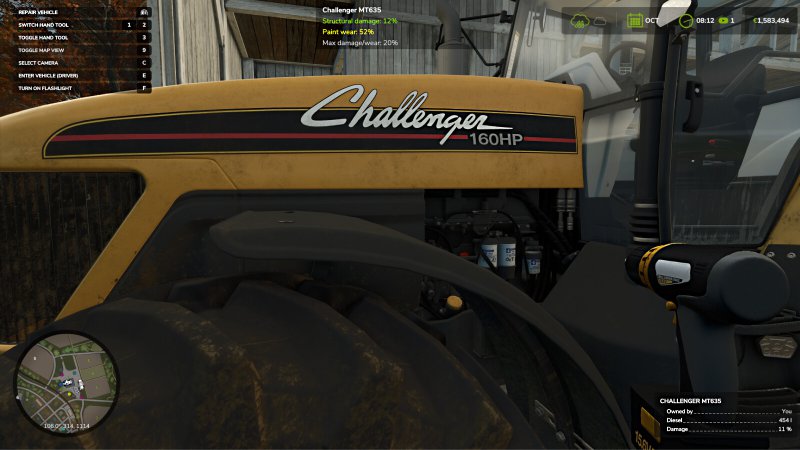
Gallery Description FS25 Self Fix And Repaint Repair your vehicles and implements directly in the field with a battery-powered drill and restore their paintwork with a spray can. No more trips to the workshop! Doing the work yourself costs a fraction of what a professional repair and repaint would set you back. Battery Drill Price: $250 Description: When using this tool, the necessary money for the repair will be deducted, the final cost will be much lower than what you would pay at the workshop. Spray Can Price: $1,000 Description: The spray can has a maximum of 10 uses, each use repaints an amount that depends on the size of the vehicle or implement to be painted, an expensive vehicle requires more uses. The final cost will be much lower than what you would pay at the workshop. Credits NYKK3

Published: May 1, 2026

Downloads: 0Ratings: no votes yet.
0
Wildlife Feeder Infos

Wildlife Feeder Infos

Gallery Description FS25 Wildlife Feeder Infos This mod adds a marker to feeding stations from the Vredo Pack DLC when placing them, allowing you to view and check the feeding station’s 250-meter action radius or effective radius before placing it permanently. Additionally, the feeding station’s info box (bottom right) is expanded to include two pieces of information: “Fed last year” and “Fed this year” This lets you know the current status of each feeding station to avoid damage caused by wildlife. One of the values must be “Yes.” Since there is no official information available yet, here is an explanation of the effective radius and feeding statuses (the mod does not change these). In addition, Mod 2 fixes current bugs related to the feeding stations in version 1.0.0.0 of the DLC: – The status for last year and this year is not loaded correctly when loading a save file – The fill level is set to 0 liters in every winter month instead of being reduced to 1/3 of capacity IMPORTANT: This mod only works if the Vredo Pack DLC is installed and active. None of the mod’s functions will be executed if the DLC is not installed or not active. Since there is currently no official information or in-game help regarding feeding stations, here is an explanation of their radius of effect and feeding stats (the mod does not change these). If any of the farm’s feeding stations were filled last year or this year, the farm’s fields will be completely spared from wildlife damage—the radius and factor then play no role at all. This means: a filled feeding station protects the entire farm for two years (this year + last year). A season lasts 3 months. Each month, the feeding stations consume 1/3 of their capacity. The feeding stations must therefore be refilled once a year. Note: The winter months are December, January, and February. The new year for the feeding stations therefore begins in March. If the feeding stations have not been refilled, there is a risk of wildlife damage to your own fields. In this case, the 250-meter radius of the feeding stations comes into effect. Without feeding stations in place, the risk of wildlife damage is 10%. By setting up feeding stations, the probability is reduced to 5% within the radius of the respective feeding station. As long as you have at least one feeding station that was filled last year or this year, all of your farm’s fields are protected against wildlife damage. A feeding station requires at least 10 mature trees within a 50-meter radius to be placed. Credits Helfer B.

Published: May 1, 2026

Downloads: 0Ratings: no votes yet.
0
Tip Side HUD

Tip Side HUD

Gallery Description FS25 Tip Side HUD This mod adds a new HUD that displays the currently selected tip or discharge side of the currently relevant vehicle or implement. This makes it possible to keep track of the active unloading side at all times without having to leave the help menu open. The current vehicle, attached implements and body configurations are supported. The selected implement is also taken into account so that the display matches the vehicle or tool currently in use as closely as possible. Depending on the vehicle or body type, the HUD shows the detected tip side as text together with a matching icon, for example: – Front / Rear – Left / Right – Left front / Right rear – Grain slider – Push floor – Ramp In addition, the HUD position can be adjusted easily through the settings menu: – X offset of display – Y offset of display Additional features: – Support for German and English – HUD scaling is taken into account – matching accent color is automatically taken from the game HUD – works with vehicles, trailers and attached implements Credits EWW_Bobo

Published: May 1, 2026

Downloads: 0Ratings: no votes yet.
0
Seed Select

Seed Select

Gallery Description FS25 Seed Select Seed Select is a script mod that adds a hold-to-select seed picker for compatible seeders and planters. Hold Y with a seeder or planter attached to open the picker, move the mouse over the desired seed, and release Y to select it. A quick tap of Y still keeps the normal base-game seed cycling behavior. The picker locks player, vehicle, and camera movement while open to prevent accidental driving or camera movement during selection. Credits plutogaming91

Published: May 1, 2026

Downloads: 0Ratings: no votes yet.
0
Real Furrow Fix

Real Furrow Fix

Gallery Description FS25 Real Furrow Fix The script slightly dampens bounce and reduces the physical width of the wheel in the furrow to 1 cm when ploughing. Credits Blodisgo

Published: Apr 30, 2026

Downloads: 0Ratings: no votes yet.
0
Furrow Wheel

Furrow Wheel

Gallery Description FS25 Furrow Wheel The script improves driving comfort when ploughing, especially when a tractor wheel is running in the furrow. It significantly reduces bouncing and makes the tractor easier to control. The mod works with all tractors. Credits TruflosMods

Published: Apr 30, 2026

Downloads: 0Ratings: no votes yet.
0
Tool Position Saver

Tool Position Saver

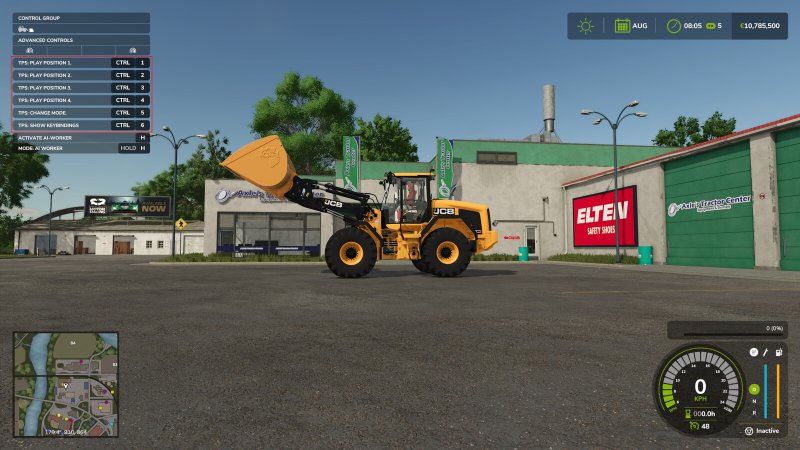
Gallery Description FS25 Tool Position Saver Tool Position Saver – Save up to 4 Positions! This mod allows you to save up to 4 positions, if at least one vehicle or implement has active mouse controls. For example a wheel loader with a shovel, a conveyor belt of a beet harvester or a forklift and so on. With set position X, you can save the current position to the corresponding slot. With play position, the corresponding slot will be played. With switch mode you change the input mode to setting, playing positions or to deleting positions. Default keybinds are: Set/Play/Delete position 1: Left Control + 1 Set/Play/Delete position 2: Left Control + 2 Set/Play/Delete position 3: Left Control + 3 Set/Play/Delete position 4: Left Control + 4 Changes mode between save/play and delte for the postitions: Left Control + 5 Toggle show keybinds: Left Control + 6 Credits Courseplay.devTeam

Published: Apr 30, 2026

Downloads: 0Ratings: no votes yet.
0
Realistic 6.7L JohnDeere T4V2CR Sound (Prefab)

Realistic 6.7L JohnDeere T4V2CR Sound (Prefab)

Gallery Description FS25 Realistic 6.7L JohnDeere T4V2CR Sound (Prefab) A new realistic 6.7L JohnDeere T4V2CR Sound.Ideal for your John Deere John Deere 7030 Premium Series. Created with the GIANTS Loop Synthesis Tool. Credits OstblockAgrar_TV

Published: Apr 30, 2026

Downloads: 0Ratings: no votes yet.
0
Construction Favorites

Construction Favorites

Gallery Description FS25 Construction Favorites v1.0.1.0 Add a touch of convenience to your game by organizing your most used buildings and landscaping tools. Instead of constantly searching for the same items in the construction menu, you can now save your favorite items in up to 9 customly colored groups for quick and easy access. Features: – A new “Favorites” category right inside the construction menu. – Full support for all base game, DLC, and modded placeables, including landscaping brushes. – Create up to 9 customizable groups with unique names and distinct colors. – Quickly identify your favorited items by their color-coded star icons. Hotkeys: – Press ‘T’ to add or remove the selected item to/from the active favorite group. – Press ‘G’ to cycle through favorite groups or create new groups. – Press ‘Delete’ to delete the currently active group. Changelog Version 1.0.1.0: – Improved favorites storage with portable paths to survive mod folder changes. – Removed automatic deletion of favorites for uninstalled mods due to the changes above. – Fixed placeholder icon being drawn when the construction UI is hidden. For more info, bug reports, or to contribute, check out GitHub (modnext/constructionFavorites). Credits aaw3k

Published: Apr 30, 2026

Downloads: 0Ratings: no votes yet.
0
Wachoo Preset

Wachoo Preset

Gallery Description FS25 Wachoo Preset Lighting – https://sharemods.com/ldc9j1z3io4c/environment.xml.html Brightness 0.7 The latest version of ReShade Credits Wachoo

Published: Apr 29, 2026

Downloads: 0Ratings: no votes yet.