FS-Portal.euFS-Portal.euMod Catalog

In catalog

16,417

Farming Simulator versions

Mods

Categories

Useful things

883 mods

Browse 883 FS25 mods in Useful things with direct links to each mod page.

0
Unload Bale Wrap

Unload Bale Wrap

Gallery Description FS25 Unload Bale Wrap v1.0.1.0 Some farmers use different wrap colors to keep their forage types organized in storage. To switch colors, they simply unload the old rolls, load new ones, and start wrapping. In FS25, you can’t unload old rolls. When you load a new color, it only fills the empty slots, so the wrapper works through the remaining old-color rolls first, leaving you with mixed-color bales. This mod adds that missing step: unload the old wrap with a single key combo and start baling with the color you actually wanted. FEATURES: – Unloads all wrap film (storage rolls and spindle rolls) with a single key combo – Refreshes the HUD fill levels and 3D visuals correctly – Leaves twine, net wrap and silage additive completely untouched – Restores spindle visuals automatically when fresh wrap film is loaded – Works on integrated baler-wrappers and standalone wrappers COMPATIBLE WITH: Integrated baler-wrappers: Goeweil G-1 F125 Kombi, Goeweil Vario Master, John Deere C441R, Massey Ferguson Baler 4160V, Fendt Rotana 160 V Combi. Standalone wrappers: KUHN SW 4014, Goeweil G5020, Goeweil G4010 Q Profi, Goeweil G1015, Anderson Group Hybrid X. Should work on any machine that uses BALE_WRAP consumables. Unloading refunds the same per-liter price you paid when you reloaded that wrap, so swapping colors is cost-neutral: dump the old, buy a fresh pallet in your new color. Default key: Right Ctrl + U (rebind in game settings to your preference). Changelog v1.0.1.0: – Fixed: keybind unresponsive on integrated mod baler-wrappers – Added: cash refund when unloading wrap film, matches the per-liter price the game charges on reload – Added: in-game settings panel (confirm before unloading, on-screen message position/size/color) – Added: French locale, color-switch hint, in-vehicle keybind prompt – Added: load confirmation message — when loading wrap film into an empty wrapper, an on-screen “Loaded with ” message tells you exactly what was loaded This mod may only be hosted on the official GIANTS ModHub. Redistribution on other websites is not permitted without the author’s written consent. Credits Kijbev

Published: May 11, 2026

Downloads: 0Ratings: no votes yet.
0
Enhanced Mod Menu

Enhanced Mod Menu

Gallery Description FS25 Enhanced Mod Menu v1.6.0.0 This FS25 modification adds a mod and cheat menu with a huge range of functionality. Dozens of features are available. General Menu Features: – Full in-game Enhanced Mod Menu for Farming Simulator 25, opened with Left Alt + M; – Favorites system for quick access to frequently used functions; – Recent actions section; – Function search with search results; – Active cheats overview; – Undo option for the last action; – Reset button to restore supported changes to default values; Money And Economy: – Preset money options: add or remove $10,000, $100,000, or $1,000,000; – Custom money editing: add, remove, or set the balance to a custom amount; – Ideal Market option; – Dynamic Difficulty Breaker option; – Refund All Costs; – Free Purchases; – Free Buildings; – Daily costs toggle; – Instant Production Payback; – Currency selector with multiple currencies; – Custom currency creation with editable code, name, symbol, and exchange rate; Contracts: – Infinite Contracts; – Custom contract reward multiplier; – Instant completion for all contracts; – Contract board refresh; Time, Weather And Seasons: – Weather control: clear sky, rain, snow, and tornado; – Editable temperature; – Calendar date selection; – Custom clock and time editing; – Quick time presets: dawn, morning, noon, evening, and night; – Time skip options: 1 day, 2 days, 7 days, 1 month, 3 months, 6 months, or 1 year; – Editable time scale; – Freeze Time option; – Season switching: spring, summer, autumn, and winter; – Field requirements override; – Weather impact override; – Always Ideal Conditions mode; Player Tools: – No Clip mode; – Flight Mode; – Super Strength; – Player Invisible mode; – Default HUD toggle; – Editable player run speed; – Editable player jump height; World Cleanup And Markers: – Traffic toggle; – Pedestrian toggle; – Owned pallet cleanup; – Owned bale cleanup; – Loose owned freight cleanup; – Tracking markers for owned pallets and bales; – Freight marker cleanup; Vehicle Tools: – Vehicle repair; – Fuel refill; – Full tank refill for all vehicle tanks; – Vehicle washing; – Vehicle dirt option; – Paint wear removal; – Paint wear adding; – Full vehicle appearance restoration; – Vehicle cloning; – Current vehicle selling; – Current vehicle deletion; – Prevent Vehicle Flips mode; – Vehicle teleportation to the map marker; – Repair for all attached implements; – Full tank refill for the attached vehicle/tool chain; – Lift all attached implements; – Lower all attached implements; Vehicle Editing: – Current vehicle max speed editing; – Current vehicle reverse speed editing; – Current vehicle power editing; – Power reset option; – Current vehicle mass editing; – Crop damage toggle for the current vehicle; – Ghost Mode for the current vehicle; – Vehicle name editing; – Vehicle configuration browser; – Vehicle configuration option switching; – Selected vehicle configuration application; – Vehicle configuration information display; Tool Editing: – Current tool target selection; – Tool work width editing; – Tool work speed editing; – Required power editing for tools; – Current tool cloning; Teleportation: – Teleport destination filters; – Destination selection; – Teleportation to selected destinations; Spawner: – Spawner menu with category selection; – Selected item spawning; – Pile material selection; – Custom pile amount editing; – Pile spawning; Forestry: – Tree selection; – Tree growth stage selection; – Plant one tree ahead of the player; – Plant five trees ahead of the player; – Chainsaw Crosshair; – Chainsaw speed switching; – Remove living trees within 15 meters; – Remove cut stumps within 25 meters; – Remove the nearest cut stump; – Clear cut logs within 25 meters; AI Helpers: – Free Helpers; – Finish all AI workers; – Teleportation to an active helper; Traffic Control: – Traffic cleanup

Published: May 10, 2026

Downloads: 0Ratings: no votes yet.
0
Real Sky (remake)

Real Sky (remake)

Gallery Description FS25 Real Sky (remake) Photorealistic 8K skies for Farming Simulator 25! Here is my own remake of the Real Sky mod from Starlexs Originally i made this for dnerdy, you can find more info about this here: https://www.instagram.com/p/DXxEl0Ojsaa/ It’s a downgraded but bug-free version of the mod, bcs i still have no idea how to fix the black sky issue and the missing sell point signs what the 4x skies have in the original mod. If i ever find the way how to fix them, this mod will be updated then. EasyDevControls required. Multiplayer support added. Have fun with the mod! (and check my insta for more pictures) Credits Pankorne, Starlexs, User12 White2115 Johny7 Heros RabateK21

Published: May 9, 2026

Downloads: 0Ratings: no votes yet.
0
Farm Tablet

Farm Tablet

Gallery Description FS25 Farm Tablet v2.3.0.0 FarmTablet — A compact, all-in-one farm management tablet for Farming Simulator 25. Originally inspired by a tablet mod for FS17, built from scratch for FS22 and now fully converted and rewritten for FS25. The goal is simple: useful farm info at a glance, without getting in the way of gameplay. The mod has been rebuilt with a clean, modular structure — every app lives in its own file, making it easy to expand, fix and improve over time. It’s actively developed and shaped by community feedback. What’s in it right now: Dashboard — farm overview with balance, fields, vehicles and world state Weather — current conditions, temperature, wind, cloud cover and forecast Fields — all owned fields with crop type and growth stage Animals — pen status with food, water and cleanliness levels Workshop — nearby vehicle diagnostics with fuel, wear and operating hours Bucket Tracker — load counter for wheel loaders and excavators Digging — excavation tracking and soil scanner App Store — browse and manage installed apps Settings — configure the tablet from the pause menu Updates — changelog and version history Mod integrations (auto-detected at runtime, safe to run without them): NPC Favor, Soil Fertilizer, Seasonal Crop Stress, Income Mod, Tax Mod What’s coming next: Better tablet visuals and frame design Icons instead of text labels Sounds, color tweaks and UI polish More apps and deeper interactions based on feedback Multiplayer improvements The mod is in active development. Bug reports, ideas and suggestions are always welcome — this is a community project and your feedback directly shapes what gets built next. Github: https://github.com/TheCodingDad-TisonK/FS25_FarmTablet COPYRIGHT NOTICE: All rights reserved. Unauthorized redistribution, copying, or claiming this mod as your own is strictly prohibited. Original author: TisonK V2.3.0.0 Three new apps have been added alongside a handful of fixes that have been building up since v2.2.0.0. Whether you’re managing a large fleet, running production chains, or just want a quick snapshot of how your farm is doing financially, this update adds a dedicated screen for each. What’s new: – Fleet Manager app — lists every vehicle you own, sorted by fuel level so the emptiest machines are always at the top. Each entry shows a fuel bar, wear bar, and total operating hours. Vehicles driven by a hired worker are flagged with an AI badge. – Production app — shows every production building you own (cheese factory, bakery, sawmill, etc.) with its current active/stalled status and the ingredients it needs and what it makes. – Farm Stats app — one screen for your full farm picture: current balance, loan, and net worth; session income and expenses; field count and total hectares owned; vehicle, animal pen, and production building counts; plus current day, season, and time. – App Store fix — the Mod Integrations section now always shows all supported companion mods. Previously, if a mod wasn’t installed it simply didn’t appear, leaving the list looking empty. Uninstalled mods now show dimmed with a note on which mod to install. What’s fixed: – Farm Admin and Time Controls apps now work correctly in multiplayer (non-host players no longer see errors when opening them). – Mouse input handling has been rewritten to use the proper FS25 event system — this fixes rare conflicts with other mods that also handle mouse clicks. – Crop Stress app moisture data was reading from the wrong field in some situations — corrected. – Soil health data is now shown correctly in the Crop Stress and Soil Fertilizer drawers. – Dashboard widget customisation: you can now toggle individual dashboard sections on and off to show only what matters to you. – Contracts app added in a previous patch — lists your active contracts with completion status, reward, and time remaining. Save compatibility: no migration needed. Load your existing save and everythi

Published: May 8, 2026

Downloads: 0Ratings: no votes yet.
0
Field Notes

Field Notes

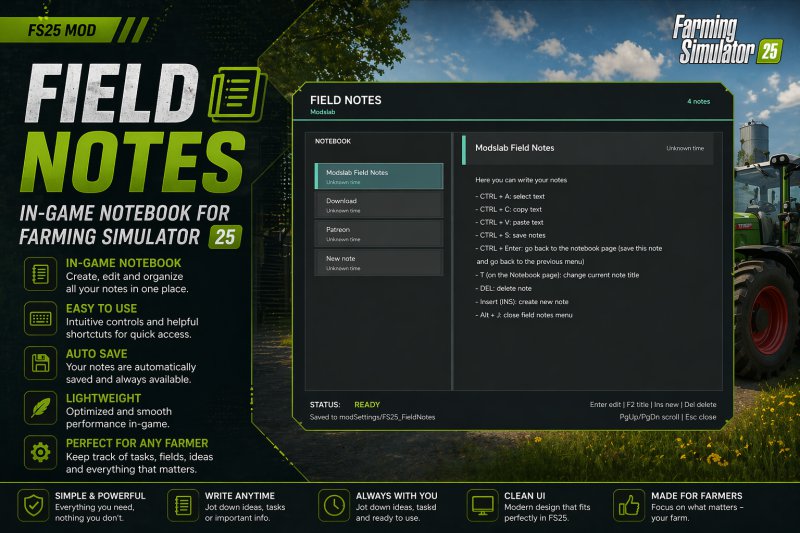
Gallery Description FS25 Field Notes v1.3.0.0 Field Notes adds a separate notebook where you can create and manage your notes. You can: – Create multiple notes; – Write, save, and delete anything you want; – Select, copy, and paste text (basic editor functions). To open, press Alt + J. V1.3.0.0: – Added the ability to place icons next to the note title – Added the ability to create separate task notes. You add tasks, and once you complete them, you tick the checkbox and the text gets crossed out. A convenient daily planner for tracking completed tasks. Credits Modslab Uploaded by Modslab

Published: May 7, 2026

Downloads: 0Ratings: no votes yet.
0
Vehicle Systems

Vehicle Systems

Gallery Description FS25 Vehicle Systems Vehicle Systems adds a lightweight vehicle maintenance layer to make machines feel more alive without becoming overly complicated. The mod tracks several vehicle systems and displays their condition through a compact in-game HUD. Included systems: Oil System Oil condition slowly wears down through use. As oil condition gets worse, the vehicle can begin showing warnings and reduced reliability. If ignored for too long, the vehicle may reach a critical oil state and require service before it is considered healthy again. Fuel Filter System The fuel filter wears over time while the vehicle is running. A dirty or restricted fuel filter can cause performance-related warnings and make the vehicle feel less dependable. If the filter becomes critically restricted, the vehicle needs service to restore proper fuel system condition. Brake System Brake condition wears during vehicle operation and braking. When the brakes become worn, the HUD will warn the player. If the brakes become critically worn, the vehicle is flagged as needing brake service and the warning state becomes more severe. Battery System The battery tracks condition/charge so vehicles have a basic electrical maintenance requirement. A weak or low battery can trigger warnings on the HUD and may require battery service or replacement when it becomes too low. HUD and Warnings The compact HUD shows the current vehicle’s system status. System values use warning colors so players can quickly see when something is worn or critical. The HUD can be repositioned through the controls menu keybind, and movement/camera input is locked while repositioning the HUD to prevent unwanted vehicle movement. Workshop Service Integration Vehicle servicing is integrated into the workshop/garage flow. Players can service individual systems or use a service-all option when multiple systems need attention. The workshop menu automatically adjusts to the systems currently needing service. Credits plutogaming91

Published: May 6, 2026

Downloads: 0Ratings: no votes yet.
0
Easy Logging

Easy Logging

Gallery Description FS25 Easy Logging Easy Logging is a lightweight script mod that improves chainsaw forestry gameplay by reducing repetitive manual cutting after a tree has been felled. Features: Automatically cuts felled trees into configurable log lengths. Includes a short fall delay before auto-cutting so the tree can begin to settle naturally. Supports thicker and more complex tree shapes by detecting long dynamic split-shapes and cutting from the nearest valid end. Includes a safe delimb assist option for chainsaw use. Includes an in-game settings menu opened with Alt + M. Includes quick cut-length cycling with Alt + L. Menu settings include auto cutting, cut length, fall delay, delimb assist, delimb diameter, and scan radius. Uses real split-shape cutting behavior and does not spawn fake logs. Supports English, German, French, and Ukrainian localization. The mod is designed to be simple, non-intrusive, and focused only on chainsaw forestry quality-of-life improvements. Credits plutogaming91

Published: May 6, 2026

Downloads: 0Ratings: no votes yet.
0
Shader by Rzep

Shader by Rzep

Gallery Description FS25 Shader by Rzep My first upload – shaders Maybe someone will like it Credits Rzep Uploaded by Rzep

Published: May 6, 2026

Downloads: 0Ratings: no votes yet.
0
Color Grading by AgroCarpathia

Color Grading by AgroCarpathia

Gallery Description FS25 Color Grading by AgroCarpathia v1.0.0.1 Hello We would like to present the color grading setup used on our virtual farm – AgroCarpathia, refined to perfection by my team The installation process is very simple, just move the contents of the folder to the following directory: \Steam\steamapps\common\Farming Simulator 25\data\maps\mapUS\config – and replace the existing files. (I recommend you back up the original files) To make it work on maps outside the US region, you need to install the Additional Settings mod from ModHub. After launching the game, go to the new settings category, set Custom Lighting to Riverbend Springs, and you will have the new colors! In the screenshots, the in-game brightness is set to 0.7. However, since every monitor displays colors differently, this setting is not mandatory and can be adjusted to your preference. Enjoy V1.0.0.1 Minor changes due to high brightness on some monitors. Credits AgroCarpathia

Published: May 5, 2026

Downloads: 0Ratings: no votes yet.
0
Rent Your Field

Rent Your Field

Gallery Description FS25 Rent Your Field Rent out your unused fields to neighbors and earn passive income! This mod allows you to lease your farmland to neighbors and receive monthly payments based on the field value and game difficulty. Features: – Rent out your owned fields to neighbors – Monthly passive income (2.0% of field value) – Difficulty-based earnings multiplier – Configurable minimum lease duration (default: 12 months) – Early termination with penalty (50% of remaining months’ income) – Automatic monthly payments – Multiplayer support How to use: 1. Select a field you own 2. Press the rent button 3. The field will be leased to the AI 4. First payment received the month after renting out the field 5. Subsequent monthly payments are automatic 6. You can terminate at any time, but a penalty applies if terminated before the minimum duration expires (no penalty if terminated before the first payment) Settings: – Minimum lease duration: 3-24 months (configurable) – Monthly income: 2.0% of field value – Difficulty multiplier: Easy (1.2x), Normal (1.0x), Hard (0.8x) – Rent fields with placeables: Yes/No (default: No) – Auto termination probability: 0-100% (default: 20%) Credits NYKK3

Published: May 5, 2026

Downloads: 0Ratings: no votes yet.