FS-Portal.euFS-Portal.euMod Catalog

In catalog

16,436

Farming Simulator versions

Mods

Categories

Useful things

883 mods

Browse 883 FS25 mods in Useful things with direct links to each mod page.

0
Advanced Damage System beta 5

Advanced Damage System beta 5

Gallery Description FS25 Advanced Damage System beta 5 Attention: BETA Version Please note: this mod is currently in BETA. Always back up your savegames before using it. Important: It is strongly recommended to read the Mod Guide at the bottom of the GitHub main page (https://github.com/id577/FS25_AdvancedDamageSystem). Without understanding the core mechanics, ADS can easily become frustrating, as improper maintenance and rough operation will lead to frequent breakdowns. Advanced Damage System (ADS) Advanced Damage System is a complete overhaul of the standard vehicle damage and maintenance mechanics in Farming Simulator 25. A machine’s reliability now depends directly on how carefully and efficiently you operate it. The harder you push your equipment and the less attention you pay to maintenance, the more often it will fail. There are no more instant “one-click” repairs. Maintenance now takes time, resources, and planning. You will need to monitor wear, service your vehicles on time, and manage your fleet properly so that a breakdown does not interrupt important fieldwork. Quick Guide If you do not want to read the full guide but still want to play with ADS without constant breakdowns and unnecessary frustration, just follow these three rules: 1. Always follow the service interval. By default, the recommended interval is about 5 operating hours on average. You can check it: – in the workshop, – in the vehicle info panel when looking at the machine, – in the ADS fleet management menu opened with the P key. Once the interval is reached, perform the Maintenance procedure in the workshop. 2. Inspect and prepare your machines every day. Perform a daily inspection by holding the R key near the vehicle, and do basic pre-shift maintenance. Clean the machine with the Air Blower and lubricate machines that require it with the Grease Gun. These simple routine actions greatly reduce the risk of avoidable failures. 3. Do not abuse your equipment. Avoid overloading, overheating, using implements that are too heavy or too demanding for the machine, excessive wheel slip in mud, hard work on a cold engine, and high-speed driving over rough terrain. A simple rule applies here: if something would be harmful to the machine in real life, it is harmful in ADS too. Key Features Complete Replacement of the Vanilla Damage System Vehicles are divided into separate critical systems: engine, transmission, hydraulics, cooling, fuel, working systems, electrical, and chassis. Each system has its own wear factors based on operating conditions. For example, excessive wheel slip increases transmission wear, while rough high-speed driving damages the chassis. Regular Maintenance Becomes Essential Scheduled servicing is no longer optional. It is the main way to prevent accelerated wear and avoid expensive repairs or overhauls. Dynamic Breakdowns The mod includes dozens of breakdowns tied to specific systems. Each failure has its own gameplay effects and can develop into more serious problems if ignored. Reworked Workshop Logic The workshop menu now includes inspection, repair, maintenance, and overhaul. Every procedure takes real in-game time, so repair planning becomes part of normal vehicle management. Realistic Thermal Simulation Engines need proper warm-up and can overheat under heavy load, especially in hot weather or when cooling airflow is restricted. Ignoring temperature can have serious consequences. Battery and Alternator Simulation Batteries can discharge, alternators can fail, and starting the engine can become difficult. If necessary, you can use one vehicle to jump-start another. Vehicle-Specific Characteristics Machines differ by brand and age in Reliability and Maintainability. More reliable vehicles wear more slowly and break down less often, while more maintainable vehicles are cheaper and faster to repair. Pre-Shift Inspection and Maintenance Before heading to the field, vehicles should be inspected and

Published: Apr 24, 2026

Downloads: 0Ratings: no votes yet.
0
BUG ModManager

BUG ModManager

Gallery Description FS25 BUG ModManager v3.3.3.0 This is not a MOD! It is a program that allows you to manage your mods before launching the game. Keep the program in a different location from the folder where your mods are stored. Technically, it works as follows: # Every mod contains a file named modDecs.xml. The game first reads this file and then uses the relevant instructions within it to locate the other files it needs to read. The program works on a similar principle. It first locates the modDecs.xml file inside the mod’s ZIP file. Then it retrieves the necessary information from this file and executes the corresponding functions. I had to spend money to develop version 3.0.0.0 of the program. If you’d like to support the project, you can make a donation toward its development. The relevant section is available within the program. Thank you in advance to everyone who has shown interest. Installation : No installation is required. Simply extract the file to a folder. NOTE 1: Cache and other files generated when the new ModHub integration is run accumulate next to the EXE file. In versions after 3.3.0.0, simply modifying the EXE file prevents the program from rebuilding everything from scratch. NOTE 2: Make sure you enter the correct EXE file paths when the program starts. The default paths are listed below. NOTE 3: Starting with this version, updates and fixes will be delayed due to financial constraints. Once I have resolved my personal financial situation, the program’s development process will return to its previous pace. Steam/Epic Paths : SavePath : Documents\My Games\FarmingSimulator2025 ModPath : Documents\My Games\FarmingSimulator2025\mods GamePath Steam : C:\Program Files (x86)\Steam\steamapps\common\Farming Simulator 25 GamePath Epic : C:\Program Files\Epic Games\FarmingSimulator25 Xbox Paths : SavePath : Documents\My Games\FarmingSimulator2025 ModPath : C:\Users\[Username]\AppData\Local\Packages\GIANTSSoftware.FarmingSimulator25PC_[RandomID]\LocalCache\Local\mods GamePath Xbox : C:\Users\[Username]\AppData\Local\Packages\GIANTSSoftware.FarmingSimulator25PC_[RandomID]\LocalCache\Local\ IMPORTANT! : I’ve tested everything, but it’s not possible for me to try every possible scenario. Therefore, if you encounter an error, please share the crash.log file created alongside the program’s EXE file and a screenshot of the error. Contact: [email protected] LAST NOTE : The program can run on its own, but it still includes a dependency checker. If it prompts you to install .NET 8, you can download it from the official Microsoft website. V3.3.3.0 1. The necessary editing systems for “Animal Husbandry” have been integrated into the Edit window. 2. Five new filters have been added to the main window. You can now filter by Author, Brand, Wheel, Map, and Script. 3. An issue in the ModHub Manager that prevented users from performing other actions while downloading has been resolved. You can now use the store while a download is in progress. 4. In the main window, an issue causing subsequent actions to fail during quick actions—due to the previous action not completing—has been resolved. 5. In the main window, an issue causing the page not to refresh when all currently displayed mods were deleted has been resolved. 6. An information section has been added to the status bar area in the main window, showing the number of modes currently displayed, the number of modes selected, and the total size for multiple selections. 7. Portuguese, Chinese, Japanese, Hindi, and Polish languages ​​have been added. 8. The issue of the download limit not working in the Settings area of ​​the ModHub Manager has been resolved. 9. The issue of having both disabled and enabled mods in the Mods folder, resulting in duplicate file conflicts, has been fixed. 10. A “_BAK” feature has been added to the ModHub Manager to detect disabled mods. V3.3.2.0 1. The issue where the name of the relevant XML file was changed to “ZIP

Published: Apr 24, 2026

Downloads: 0Ratings: no votes yet.
0
Start Filling What?: Smart Loading Prompts

Start Filling What?: Smart Loading Prompts

Gallery Description FS25 Start Filling What?: Smart Loading Prompts Stop guessing what you’re loading! This mod dynamically updates the “Start filling” and “Refill” prompts in your F1 menu to show the specific product name. Whether you are at a water station, a diesel pump, or parked next to a seed bag, the interface will now display exactly what is being transferred (e.g., “Start filling (Water)” or “Refill (Seeds)”). Works with map-integrated stations, buyable pallets, and big bags. Credits TommyNookah

Published: Apr 24, 2026

Downloads: 0Ratings: no votes yet.
0
Player Last Position

Player Last Position

Gallery Description FS25 Player Last Position v1.0.1.0 Saves each player’s position on disconnect, independently of the server save cycle. Players are teleported back to their last position on reconnection. Works on foot and in vehicles. Compatible with singleplayer, multiplayer and dedicated servers. Issues & suggestions: https://github.com/Squallqt/FS25_PlayerLastPosition Changelog: 1.0.1.0: – Save position on game save to handle singleplayer Alt+F4 edge case – Fix player rotation not being restored on reconnect 1.0.0.1: – Fix saved positions being shared across different savegames 1.0.0.0: – Initial release Credits Squallqt

Published: Apr 24, 2026

Downloads: 0Ratings: no votes yet.
0
Helper Price Changer

Helper Price Changer

Gallery Description FS25 Helper Price Changer v1.0.0.1 This mod will make you able to thange the prices of the ingame AI helper. You will be able to select the following: 10%, 25%, 50%, 100%, 150%, 200%, 250%, 300%, 400%, 500%, 1000% or 2000% of the normal helper hour rate. Changelog 1.0.0.1 – Now remembering settings between saves Credits Chris1969

Published: Apr 24, 2026

Downloads: 0Ratings: no votes yet.
0
Weather Control (1.2.0.0)

Weather Control (1.2.0.0)

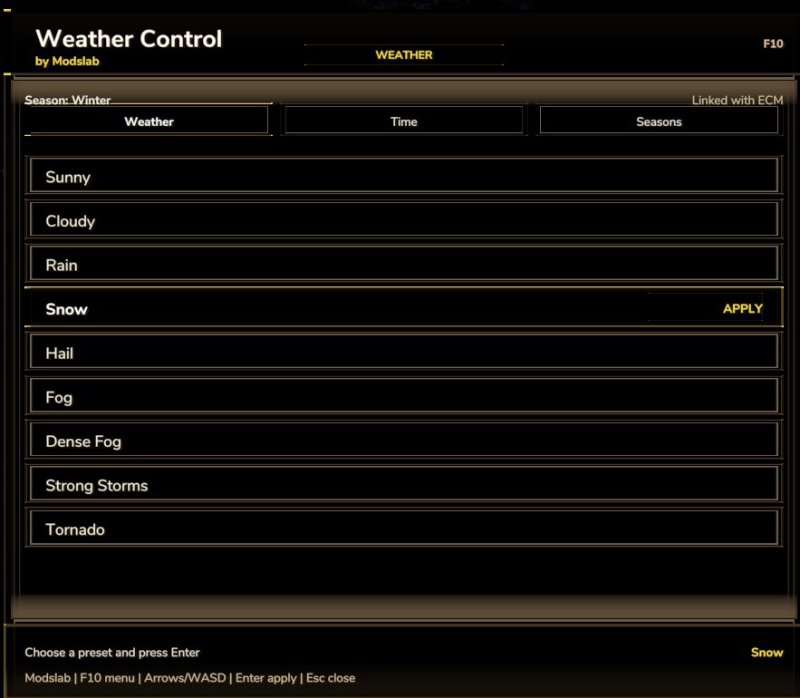
Gallery Description FS25 Weather Control (1.2.0.0) Global update for my old mod. Now works as a standalone menu (Press F10 to open). In this menu, you can – Change weather conditions (also added new options like fog, storm, etc) – Change seasons (added in version 1.2.0.0) – Change nightime/daytime (added new time options in version 1.2.0.0) Please, always keep my original link! Credits modslab (me) Uploaded by Modslab

Published: Apr 23, 2026

Downloads: 0Ratings: no votes yet.
0
Steering Lock

Steering Lock

Gallery Description FS25 Steering Lock Locks a vehicle to a compass heading with gentle persistent correction. Works with any steerable vehicle. All keys are unbound by default. Assign them in the in-game Controls menu under “Steering Lock”. Actions / Keybinds: – Activate / Deactivate: Toggle the steering lock on or off – Cycle Heading Preset: Cycle through 0 / 90 / 180 / 270 degrees – Clear Heading: Clear the preselected heading, and disable the hud overlay. – Get Current Heading: Capture the vehicle’s current compass heading – Fine Adjust Heading +0.1 deg: Nudge the target heading clockwise (hold to select faster) – Fine Adjust Heading -0.1 deg: Nudge the target heading counter-clockwise (hold to select faster) – Reposition HUD: Move the HUD display to a different location Usage: First set a heading using the preset cycle or by capturing the current heading. Fine-tune the heading with +/- adjustments if needed. Activate to lock to that heading. The heading is remembered when deactivated so you can resume without re-setting it. Works better at lower speeds, there is less impact at high speeds to avoid overcompenating and wobbling too hard back and forth. Reverse lock functionality: The lock stays active while reversing too! – the steering correction automatically inverts so the vehicle holds the same heading backward along the same line. Useful for tight silage compacting, tool work, row tasks, backing straight into unloaders and into trailers, or parking spots without losing your heading. If you want to back up freely to maneuver, just deactivate first – your heading stays remembered and one press of Activate re-engages the lock, same thing with going forwards! HUD Reposition: Press the Reposition HUD key to enter reposition mode. The mouse cursor appears automatically, with the reposition box. Move the mouse to place the HUD, then LEFT-CLICK to save. Credits mike1000195

Published: Apr 23, 2026

Downloads: 0Ratings: no votes yet.
0
Advanced Hay Drying

Advanced Hay Drying

Gallery Description FS25 Advanced Hay Drying Adds a realistic moisture system to the drying of grass and hay. This mod focuses exclusively on the drying behavior of hay; it does not affect any other crops or material qualities, making it perfect if you only want hay and don’t need a complex moisture system. This mod is currently available for single-player only. – Moisture-based drying system – Grass must be dry enough before baling – Tedding increases drying speed – Seasonal influence on starting moisture – Weather affects drying and re-wetting – Adjustable gameplay settings Manage your drying process carefully to get the best results. Credits Tarabas1977

Published: Apr 23, 2026

Downloads: 0Ratings: no votes yet.
0
Teach-IN Extension

Teach-IN Extension

Gallery Description FS25 Teach-IN Extension Teach-IN Extension adds freely configurable sequences for recurring operating and workflow routines to Farming Simulator 25. Features: – 4 freely assignable Teach-In sequences – Trigger types: Immediate, Manual, Time, and Distance – Actions for cruise control C1/C2, GPS, front/rear linkage, and front/rear PTO – Clear menu for creating, editing, moving, and deleting slots – Profiles can be saved and loaded – Suitable for recurring field operations and fixed work routines – Multiplayer support Default key bindings: – Open/close menu: Left Ctrl + Left Alt + T – Start sequence 1: Left Ctrl + Left Alt + Up Arrow – Start sequence 2: Left Ctrl + Left Alt + Down Arrow – Start sequence 3: Left Ctrl + Left Alt + Right Arrow – Start sequence 4: Left Ctrl + Left Alt + Left Arrow – Stop active sequence: Left Ctrl + Left Alt + Numpad 0 – Preselect cruise control C1 directly: Left Ctrl + Left Alt + 1 – Preselect cruise control C2 directly: Left Ctrl + Left Alt + 2 Ideal for precise, repeatable field routines and convenient control of fixed work processes. Credits SebiTronik

Published: Apr 23, 2026

Downloads: 0Ratings: no votes yet.
0
Garage Menu

Garage Menu

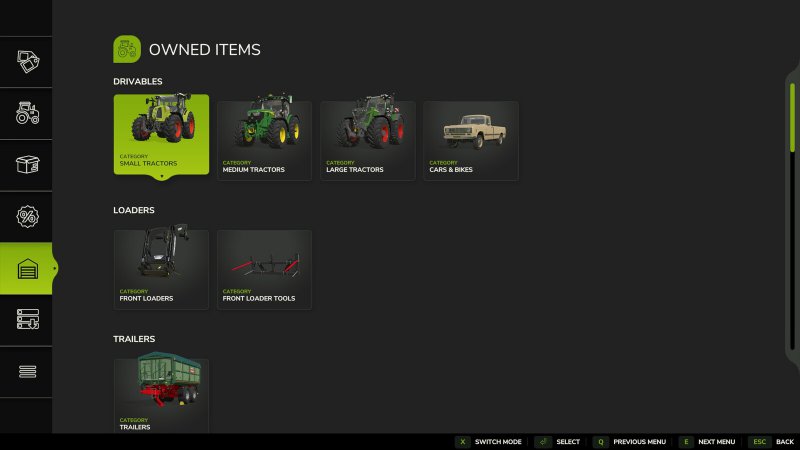
Gallery Description FS25 Garage Menu v1.0.0.4 Garage Menu A simple menu to view your owned and leased vehicles, similar to that seen in FS22. GitHub: https://github.com/sprkem/FS25_GarageMenu Changelog: 1.0.0.4: – Add additional guard to prevent issues with specific mod items. – Fix back/next menu buttons not working when clicked. 1.0.0.3: – Fix support for Buy Used Equipment. 1.0.0.2: – Add safety guard to prevent issues with custom shop categories, specifically when using FS25_TakeSingleObjects. 1.0.0.1: – If using the mod Buy Used Equipment, you can now see currently running searches in the garage menu. Credits Ozz

Published: Apr 23, 2026

Downloads: 0Ratings: no votes yet.