FS-Portal.euFS-Portal.euMod Catalog

In catalog

16,436

Farming Simulator versions

Mods

Categories

Useful things

883 mods

Browse 883 FS25 mods in Useful things with direct links to each mod page.

0
Mud and cobblestone Roads

Mud and cobblestone Roads

Gallery Description FS25 Mud and cobblestone Roads V1.0.0.1 I created 7 placeabable mud and cobblestone roads. Please don’t download them on side’s like (farmingsimulator22mods.com,www.modhoster.com,www.fs25modhub.com) because the don’t respect the original link. Based on the road kit mod made new textures with mud and cobblestone roads to use on your map. Your foiliage will be removed, but the original ground texture will remain. You can then customize like you wish to fit it in your game. V1.0.0.1 * Addepted the moddeskversion. * Adjust the store images with the right mipmaps. * Removed some unused images, smaller size of modfile. The mod may only be published on other sites with the original download link! Have a good game, Barbicha Credits Barbicha Uploaded by barbicha

Published: Feb 24, 2026

Downloads: 0Ratings: no votes yet.
0
Asphalt and Paved Roads

Asphalt and Paved Roads

Gallery Description FS25 Asphalt and Paved Roads V1.0.0.1 I created 6 placeabable asphalt and paved roads. Please don’t download them on side’s like (farmingsimulator22mods.com,www.modhoster.com,www.fs25modhub.com) because the don’t respect the original link. Based on the road kit mod made new textures with asphalt and paved roads to use on your map. Your foiliage will be removed, but the original ground texture will remain. You can then customize like you wish to fit it in your game. V1.0.0.1 * Addepted the moddeskversion. * Adjust the store images with the right mipmaps. * Removed some unused images, smaller size of modfile. The mod may only be published on other sites with the original download link! Have a good game, Barbicha Credits Barbicha Uploaded by barbicha

Published: Feb 24, 2026

Downloads: 0Ratings: no votes yet.
0
Manual Cover

Manual Cover

Gallery Description FS25 Manual Cover Manually control covers while on foot near the vehicle. Features include a separate key binding for on-foot control and configurable control modes: Manual (Outside), In-Cab (Remote), and Universal. Prevents automatic cover opening. Hotkeys: – Press X key to open/close the cover (when on foot near vehicle). – Standard cover controls apply when inside the vehicle (depending on selected mode). For more information or to report a bug, please visit GitHub (modnext/manualCover). Credits aaw3k

Published: Feb 24, 2026

Downloads: 0Ratings: no votes yet.
0
What Speed Limit

What Speed Limit

Gallery Description FS25 What Speed Limit Take full control of your working speed. Optimized for Farming Simulator 25 – Toggle Bypass: Ignore all implement speed limits. Credits Backyard Gaming

Published: Feb 24, 2026

Downloads: 0Ratings: no votes yet.
0
Autoload Pallets

Autoload Pallets

Gallery Description FS25 Autoload Pallets v1.0.0.1 All base game pallets have been modified to load faster with autoload trailers. Allowing the loading of multiple pallets at the same time. Pallets spawned before the activation of this mod will NOT have these features. Changelog 1.0.0.1: – Added autoload trigger to liquid fertilizer and herbicide IBC tanks Credits Jos

Published: Feb 24, 2026

Downloads: 0Ratings: no votes yet.
0
Slow Fold Global

Slow Fold Global

Gallery Description FS25 Slow Fold Global Slows folding animations globally, Configurable via slowFoldGlobal.xml. Credits AI-Modding, Icebear

Published: Feb 24, 2026

Downloads: 0Ratings: no votes yet.
0
Moveable Mirrors

Moveable Mirrors

Gallery Description FS25 Moveable Mirrors This mod allows you to dynamically rotate a vehicle’s mirrors—right in the game and exactly as it suits your view. No more “too much sky” in the mirror or a blind spot that’s always right where you don’t need it: You can adjust the mirrors so that you have a clear view of attachments, trailers, loads, or the rear axle. Whether you need to reverse onto a ramp, drive along the edge of a field with wide equipment, or merge smoothly into traffic: With just a few simple steps, you can adjust the angle, viewing direction, and field of view – without having to mess around with files or restarting. Your settings are saved for each vehicle and synchronized in multiplayer. Credits nilBrain

Published: Feb 24, 2026

Downloads: 0Ratings: no votes yet.
0
PowerTools

PowerTools

Gallery Description FS25 PowerTools v1.2.0.0 With the PowerTools menu you have quick and easy access to some “quality of life” features. Especially useful if you are a modder or content creator. Using a single key/button (default F12) you activate the PowerTools menu. From there you can quickly navigate to the different functions without the need for a mouse or navigating through multiple menus. MAIN FEATURES: – Remove trees via keyboard shortcut (see notes) – Add/remove money to your farm – Fill vehicle – supports vehicles with multiple tanks/storage units and accepts any filltype supported by the vehicle * – Spawn any type of pallet (including production materials like sugar and clothes) – Spawn any type of bale – supports round/square, all sizes and all types (straw, silage, cotton etc) * – Spawn tree logs – currently only supports limited number of lengths * – Toggle super speed, super strength or flight mode – Quickly save the current game, ether via hotkey or the menu * – Toggle HUD/interface on/off (now with quick command: hold F1/help menu button for ~1 second) – Repeat last command – Open PowerTools menu in alternate mode: — Restart and exit to menu uses the “hard reset” method instead of “soft reset” — Change UI scale (will be reset on restart, to permanently change the UI scale use the game settings instead) – A limited PowerTools menu can now be opened when main menu is open as well as when the game is paused – Additional time scales, hold decrease button (default: 7) to pause time, and hold increase button (default: 8) to enable/disable additional speeds * – Change field state (crop type, growth stage, ground type etc) NOTES: 1. Features marked with an asterisk (*) isn’t available on dedicated servers, only in singleplayer and self-hosted multiplayer. 2. Many of the features requires that you have admin access (to prevent cheating in multiplayer) – in single player everyone is admin though :) 3. To be able to use “Repeat last action” you need to bind a hotkey in the input binding settings 4. The new alternate mode menu uses a separate hotkey (default Right Ctrl + F12) 5. For players with a keyboard that doesn’t have the WASD layout, e.g. AZERTY, the key binding for ascending/descending (default: Q/E) in flight mode can be different (e.g. use keys A/E for AZERTY layout) 6. The Remove Tree tool doesn’t have any default keybinding (to limit the risk of accidental deletion of trees) – before using the tool, configure your keybindings and look for ‘Remove Tree’ 7. In multiplayer, trees can only be deleted on land you own (everywhere if you are the server admin). In singleplayer, you can delete trees everywhere. ___________________________________________________________ CHANGELOG: v1.2.0: – HOTFIX: Prevent non-admins from accessing the Field Options menu [#38, #51] – NEW: Remove Tree function (no default keybinding, see notes above) – FIX: Prevent script errors in ‘keyEvent’ (“invalid argument #1 to ‘pairs’ (table expected, got boolean”) [#36] – FIX: No more LUA error “attempt to index nil with ‘l10n'” when saving [#43] – FIX: Prevent the field menu to show on non-field farmland [#50] – FIX: Ensure the field menu can only be activated on owned land [#49] – FIX: Prevent the fill menu to appear on vehicles without useable fill units (e.g. tree planter Damcon PL75) [#32] v1.1.2: – HOTFIX: Filling vehicles should no longer generate a “fillType ‘UNKNOWN'” error [#46] – HOTFIX: Disable old/deprecated console command ‘qq’ [#47] v1.1.1: – NEW: Add Italian translation – NEW: Add Latin America Spanish translation – MOD: Updated ES, TR and RU translations [#45] v1.1.0: – NEW: Field menu to change crop, ground type etc – NEW: Quickly show/hide the HUD by holding down the help menu key (default: F1) – NEW: Change UI scale via the alternate menu (non-persistent) – NEW: Adds additional time scales (zero/pause as well as x1500, x5000 and x7500) – NEW: Added CZ, HU and EA translation

Published: Feb 24, 2026

Downloads: 0Ratings: no votes yet.

0
Vehicle Assistance System

Vehicle Assistance System

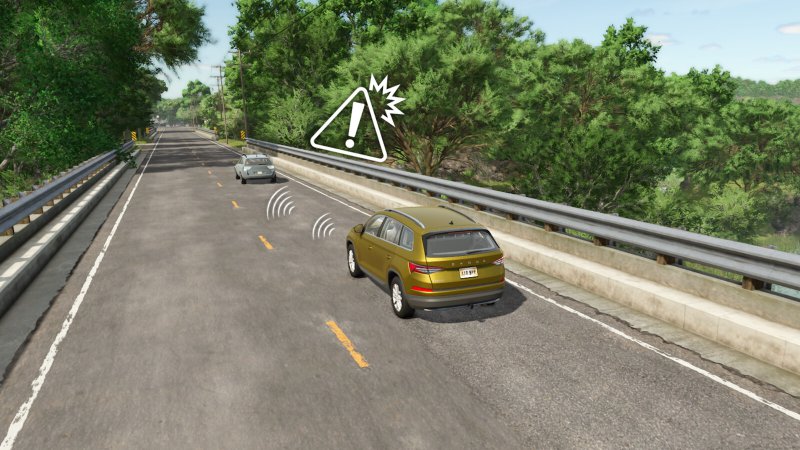
Gallery Description FS25 Vehicle Assistance System v1.0.0.1 Vehicle Assistance System (VAS) Enhance your vehicles with intelligent assistance features that make driving and maneuvering more convenient and safer. — CORE FEATURES — Parking Distance Control (PDC) – Vehicle-specific feature that must be configured in individual vehicle XMLs. (is pre-registered for several basegame, dlc and mod vehicles) – Smart sensors alert you as you approach objects when parking or maneuvering (under 10 kph), measuring distances in real-time. – Can be toggled on/off in the general settings menu. Automatic Emergency Braking (AEB) – Vehicle-specific feature that must be activated in individual vehicle XMLs. (is pre-registered for several basegame, dlc and mod vehicles) – Provides collision detection and automatic braking when obstacles appear suddenly ahead. – Activates at speeds above 10 kph with detection range up to 20 meters. – Can be toggled on/off in the general settings menu. Intelligent Cruise Control (ICC) – Globally available on all motor vehicles. – Maintains your set speed while automatically adjusting your speed to the vehicles ahead of you using adaptive distance calculation. – Respects your set cruising speed and automatically adjusts based on detected traffic. – Toggle hotkey: Alt + 3. Automatic Light Control (ALC) – Available on vehicles with light systems. – Intelligently manages low beam and high beam based on driving conditions, weather, time of day and oncoming traffic. – Automatically switches to high beam in darkness and low beam when vehicles approach. – Toggle hotkeys: Alt + F (low beam) and Alt + Ctrl + F (high beam). Reverse Camera Control (RCC) – Vehicle-specific feature that must be configured in individual vehicle XMLs. – When enabled for a vehicle, it automatically activates a rear view camera when reversing, helping you navigate tight spots with confidence. – Note: Requires the Mercedes-Benz Trucks Pack DLC. — ADDITIONAL FEATURES — Animation Action Control (AAC) – Advanced animation management system for vehicle interactions with dedicated hotkeys. Beacon Light Control (BLC) – Control beacon systems or emergency warning lights with dedicated hotkeys. Fold Cover Disabler (FCD) – Manage vehicle cover, folding and turnOnVehicle behaviors on specific vehicles through XML configuration, allowing better customization without mod conflicts. For detailed technical documentation on integrating features into custom vehicles, please refer to the vas-documentation.pdf in the mod’s sdk folder. Changelog 1.0.0.1: – Fixed: (RCC) Reverse Camera Control not activating correctly when steering direction change is set to automatic – Fixed: (ICC) Intelligent Cruise Control breaks when vehicle size parameter are inaccurate – Fixed: (ALC) Automatic Light Control does not effect attached equipment – Changed: (AEB) Increased brake force at automatic emergency brake event – Added: (FCD) disableTurnOnVehicle parameter Credits SoSi-Modding

Published: Feb 24, 2026

Downloads: 0Ratings: no votes yet.

0
Shaders By Goat + Nvidia Lighting

Shaders By Goat + Nvidia Lighting

Gallery Description FS25 Shaders By Goat + Nvidia Lighting Hello, I will share my shaders with you, the lighting I use is from Czarny, here is the link: https://www.kingmods.net/pl/fs25/mods/58702/oswietlenie-preset-czarny317-shader Nvidia Filter Settings EXPOSURE / CONTRAST 1.Exposure 0 2.Contrast -50 3.Lights 6 4.Shadows 26 5.Gamma 6 DETAILS 1. Sharpen 10 2.Transparency -16 3.HDR toning -70 4.Brightness 0 Credits Bartasgoat

Published: Feb 24, 2026

Downloads: 0Ratings: no votes yet.