FS-Portal.euFS-Portal.euMod Catalog

Im Katalog

16.431

Farming Simulator-Versionen

Mods

Kategorien

Nützliche Dinge

883 Mods

Hier findest du 883 FS25-Mods in Nützliche Dinge mit direkten Links zu den einzelnen Mod-Seiten.

0
Erweitertes Schadenssystem beta 5

Erweitertes Schadenssystem beta 5

Galerie Beschreibung LS25 Erweitertes Schadenssystem beta 5 Attention: BETA Version Please note: this mod is currently in BETA. Always back up your savegames before using it. Important: It is strongly recommended to read the Mod Guide at the bottom of the GitHub main page (https://github.com/id577/FS25_AdvancedDamageSystem). Without understanding the core mechanics, ADS can easily become frustrating, as improper maintenance and rough operation will lead to frequent breakdowns. Advanced Damage System (ADS) Advanced Damage System is a complete overhaul of the standard vehicle damage and maintenance mechanics in Farming Simulator 25. A machine’s reliability now depends directly on how carefully and efficiently you operate it. The harder you push your equipment and the less attention you pay to maintenance, the more often it will fail. There are no more instant “one-click” repairs. Maintenance now takes time, resources, and planning. You will need to monitor wear, service your vehicles on time, and manage your fleet properly so that a breakdown does not interrupt important fieldwork. Quick Guide If you do not want to read the full guide but still want to play with ADS without constant breakdowns and unnecessary frustration, just follow these three rules: 1. Always follow the service interval. By default, the recommended interval is about 5 operating hours on average. You can check it: – in the workshop, – in the vehicle info panel when looking at the machine, – in the ADS fleet management menu opened with the P key. Once the interval is reached, perform the Maintenance procedure in the workshop. 2. Inspect and prepare your machines every day. Perform a daily inspection by holding the R key near the vehicle, and do basic pre-shift maintenance. Clean the machine with the Air Blower and lubricate machines that require it with the Grease Gun. These simple routine actions greatly reduce the risk of avoidable failures. 3. Do not abuse your equipment. Avoid overloading, overheating, using implements that are too heavy or too demanding for the machine, excessive wheel slip in mud, hard work on a cold engine, and high-speed driving over rough terrain. A simple rule applies here: if something would be harmful to the machine in real life, it is harmful in ADS too. Key Features Complete Replacement of the Vanilla Damage System Vehicles are divided into separate critical systems: engine, transmission, hydraulics, cooling, fuel, working systems, electrical, and chassis. Each system has its own wear factors based on operating conditions. For example, excessive wheel slip increases transmission wear, while rough high-speed driving damages the chassis. Regular Maintenance Becomes Essential Scheduled servicing is no longer optional. It is the main way to prevent accelerated wear and avoid expensive repairs or overhauls. Dynamic Breakdowns The mod includes dozens of breakdowns tied to specific systems. Each failure has its own gameplay effects and can develop into more serious problems if ignored. Reworked Workshop Logic The workshop menu now includes inspection, repair, maintenance, and overhaul. Every procedure takes real in-game time, so repair planning becomes part of normal vehicle management. Realistic Thermal Simulation Engines need proper warm-up and can overheat under heavy load, especially in hot weather or when cooling airflow is restricted. Ignoring temperature can have serious consequences. Battery and Alternator Simulation Batteries can discharge, alternators can fail, and starting the engine can become difficult. If necessary, you can use one vehicle to jump-start another. Vehicle-Specific Characteristics Machines differ by brand and age in Reliability and Maintainability. More reliable vehicles wear more slowly and break down less often, while more maintainable vehicles are cheaper and faster to repair. Pre-Shift Inspection and Maintenance Before heading to the field, vehicles should be inspecte

Veröffentlicht: 24.04.2026

Downloads: 0Bewertungen: noch keine Stimmen.
0
BUG ModManager

BUG ModManager

Galerie Beschreibung LS25 BUG ModManager v3.3.3.0 This is not a MOD! It is a program that allows you to manage your mods before launching the game. Keep the program in a different location from the folder where your mods are stored. Technically, it works as follows: # Every mod contains a file named modDecs.xml. The game first reads this file and then uses the relevant instructions within it to locate the other files it needs to read. The program works on a similar principle. It first locates the modDecs.xml file inside the mod’s ZIP file. Then it retrieves the necessary information from this file and executes the corresponding functions. I had to spend money to develop version 3.0.0.0 of the program. If you’d like to support the project, you can make a donation toward its development. The relevant section is available within the program. Thank you in advance to everyone who has shown interest. Installation : No installation is required. Simply extract the file to a folder. NOTE 1: Cache and other files generated when the new ModHub integration is run accumulate next to the EXE file. In versions after 3.3.0.0, simply modifying the EXE file prevents the program from rebuilding everything from scratch. NOTE 2: Make sure you enter the correct EXE file paths when the program starts. The default paths are listed below. NOTE 3: Starting with this version, updates and fixes will be delayed due to financial constraints. Once I have resolved my personal financial situation, the program’s development process will return to its previous pace. Steam/Epic Paths : SavePath : Documents\My Games\FarmingSimulator2025 ModPath : Documents\My Games\FarmingSimulator2025\mods GamePath Steam : C:\Program Files (x86)\Steam\steamapps\common\Farming Simulator 25 GamePath Epic : C:\Program Files\Epic Games\FarmingSimulator25 Xbox Paths : SavePath : Documents\My Games\FarmingSimulator2025 ModPath : C:\Users\[Username]\AppData\Local\Packages\GIANTSSoftware.FarmingSimulator25PC_[RandomID]\LocalCache\Local\mods GamePath Xbox : C:\Users\[Username]\AppData\Local\Packages\GIANTSSoftware.FarmingSimulator25PC_[RandomID]\LocalCache\Local\ IMPORTANT! : I’ve tested everything, but it’s not possible for me to try every possible scenario. Therefore, if you encounter an error, please share the crash.log file created alongside the program’s EXE file and a screenshot of the error. Contact: [email protected] LAST NOTE : The program can run on its own, but it still includes a dependency checker. If it prompts you to install .NET 8, you can download it from the official Microsoft website. V3.3.3.0 1. The necessary editing systems for „Animal Husbandry“ have been integrated into the Edit window. 2. Five new filters have been added to the main window. You can now filter by Author, Brand, Wheel, Map, and Script. 3. An issue in the ModHub Manager that prevented users from performing other actions while downloading has been resolved. You can now use the store while a download is in progress. 4. In the main window, an issue causing subsequent actions to fail during quick actions—due to the previous action not completing—has been resolved. 5. In the main window, an issue causing the page not to refresh when all currently displayed mods were deleted has been resolved. 6. An information section has been added to the status bar area in the main window, showing the number of modes currently displayed, the number of modes selected, and the total size for multiple selections. 7. Portuguese, Chinese, Japanese, Hindi, and Polish languages ​​have been added. 8. The issue of the download limit not working in the Settings area of ​​the ModHub Manager has been resolved. 9. The issue of having both disabled and enabled mods in the Mods folder, resulting in duplicate file conflicts, has been fixed. 10. A „_BAK“ feature has been added to the ModHub Manager to detect disabled mods. V3.3.2.0 1. The issue where the name of the relevant XML file was changed to “ZI

Veröffentlicht: 24.04.2026

Downloads: 0Bewertungen: noch keine Stimmen.
0
Start Filling What?: Intelligente Ladeanzeige

Start Filling What?: Intelligente Ladeanzeige

Galerie Beschreibung LS25 Start Filling What?: Intelligente Ladeanzeige Schluss mit dem Rätselraten beim Beladen! Diese Mod aktualisiert dynamisch die Anzeigen „Befüllen starten“ und „Nachfüllen“ im F1-Menü, um den spezifischen Produktnamen anzuzeigen. Egal ob an einer Wasserstation, einer Zapfsäule oder neben einem Saatgutsack – das Interface zeigt nun genau an, was übertragen wird (z. B. „Befüllen starten (Wasser)“ oder „Nachfüllen (Saatgut)“). Funktioniert mit kartenintegrierten Stationen, kaufbaren Paletten und Big Bags. Credits TommyNookah

Veröffentlicht: 24.04.2026

Downloads: 0Bewertungen: noch keine Stimmen.
0
Letzte Spielerposition

Letzte Spielerposition

Galerie Beschreibung LS25 Letzte Spielerposition v1.0.1.0 Speichert die Position jedes Spielers beim Trennen, unabhängig vom Server-Speicherzyklus. Spieler werden bei Wiederverbindung an ihre letzte Position teleportiert. Funktioniert zu Fuß und in Fahrzeugen. Kompatibel mit Einzelspieler, Mehrspieler und dedizierten Servern. Issues & Vorschläge: https://github.com/Squallqt/FS25_PlayerLastPosition Changelog: 1.0.1.0: – Position wird beim Spielstand-Speichern gesichert (Einzelspieler Alt+F4 Sonderfall) – Spielerrotation wird jetzt beim Wiederherstellen korrekt angewendet 1.0.0.1: – Gespeicherte Positionen werden nicht mehr zwischen Spielständen geteilt 1.0.0.0: – Erstveröffentlichung Credits Squallqt

Veröffentlicht: 24.04.2026

Downloads: 0Bewertungen: noch keine Stimmen.
0
Helfer Preiswechsler

Helfer Preiswechsler

Galerie Beschreibung LS25 Helfer Preiswechsler v1.0.0.1 Diese Mod ermöglicht es dir, die Preise der KI-Helfer im Spiel anzupassen. Du kannst folgende Werte auswählen: 10%, 25%, 50%, 100%, 150%, 200%, 250%, 300%, 400%, 500%, 1000% oder 2000% des normalen Stundensatzes. Änderungsprotokoll 1.0.0.1 – Einstellungen werden nun zwischen Speicherständen beibehalten Credits Chris1969

Veröffentlicht: 24.04.2026

Downloads: 0Bewertungen: noch keine Stimmen.
0
Wettersteuerung (1.2.0.0)

Wettersteuerung (1.2.0.0)

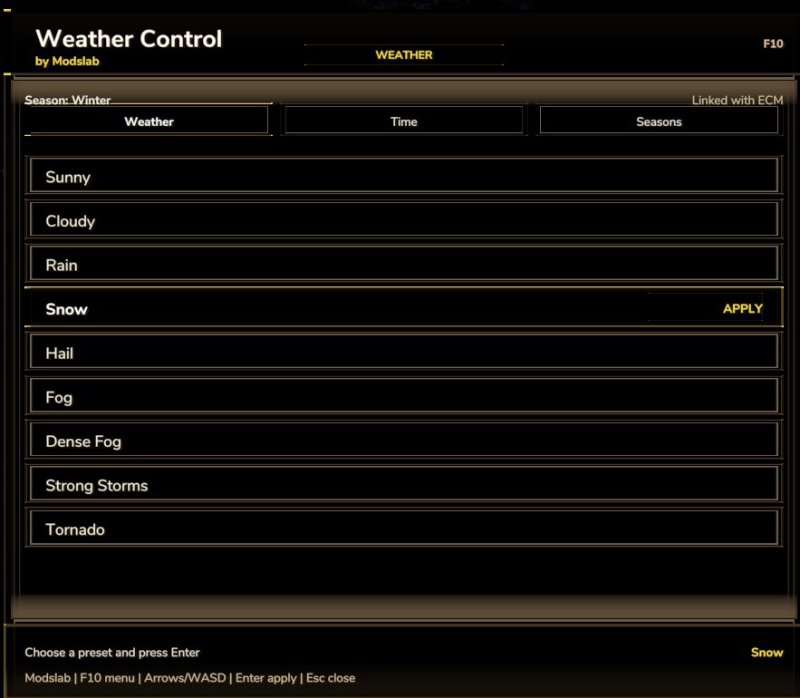
Galerie Beschreibung LS25 Wettersteuerung (1.2.0.0) Globales Update für meine alte Mod. Funktioniert jetzt als eigenständiges Menü (F10 zum Öffnen). In diesem Menü können Sie: – Wetterbedingungen ändern (neue Optionen wie Nebel, Sturm usw. hinzugefügt) – Jahreszeiten ändern (hinzugefügt in Version 1.2.0.0) – Tag/Nacht ändern (neue Zeitoptionen in Version 1.2.0.0 hinzugefügt) Bitte behalten Sie meinen Original-Link bei! Credits modslab (me) Hochgeladen von Modslab

Veröffentlicht: 23.04.2026

Downloads: 0Bewertungen: noch keine Stimmen.
0
Lenksperre

Lenksperre

Galerie Beschreibung LS25 Lenksperre Arretiert ein Fahrzeug auf eine bestimmte Kompassrichtung und nimmt dabei sanfte, kontinuierliche Kurskorrekturen vor. Funktioniert mit jedem lenkbaren Fahrzeug. Standardmäßig sind keine Tastenbelegungen zugewiesen. Nehmen Sie die Zuweisung im Spielmenü unter „Steuerung“ im Abschnitt „Steering Lock“ vor. Aktionen / Tastenbelegungen: – Aktivieren / Deaktivieren: Schaltet die Lenkarretierung ein oder aus – Kurs-Voreinstellung wechseln: Schaltet durch die Winkel 0 / 90 / 180 / 270 Grad – Kurs löschen: Löscht den vorgewählten Kurs und deaktiviert das HUD-Overlay. – Aktuellen Kurs übernehmen: Erfasst die aktuelle Kompassrichtung des Fahrzeugs – Kurs feinjustieren +0,1°: Verschiebt die Zielrichtung im Uhrzeigersinn (gedrückt halten für schnellere Anpassung) – Kurs feinjustieren -0,1°: Verschiebt die Zielrichtung gegen den Uhrzeigersinn (gedrückt halten für schnellere Anpassung) – HUD neu positionieren: Verschiebt die HUD-Anzeige an einen anderen Bildschirmbereich Verwendung: Legen Sie zunächst eine Zielrichtung fest – entweder durch Durchschalten der Voreinstellungen oder durch Übernahme des aktuellen Fahrzeugkurses. Passen Sie die Richtung bei Bedarf mit den +/- Tasten fein an. Aktivieren Sie die Funktion, um das Fahrzeug auf diesen Kurs zu arretieren. Die gewählte Richtung bleibt auch nach der Deaktivierung gespeichert, sodass Sie die Arbeit ohne erneute Einstellung fortsetzen können. Die Funktion arbeitet bei niedrigeren Geschwindigkeiten am effektivsten; bei hohen Geschwindigkeiten wird die Korrekturwirkung reduziert, um ein Übersteuern und starkes Hin-und-her-Pendeln des Fahrzeugs zu vermeiden. Funktion beim Rückwärtsfahren: Die Lenkarretierung bleibt auch beim Rückwärtsfahren aktiv! – Die Lenkkorrektur kehrt sich automatisch um, sodass das Fahrzeug die gewählte Richtung auch rückwärts exakt auf derselben Linie beibehält. Dies ist besonders nützlich beim präzisen Verdichten von Silage, bei Arbeiten mit Anbaugeräten, bei Reihenkulturen, beim geraden Rückwärtsrangieren an Abladestellen oder beim Einparken, ohne dabei die einmal gewählte Ausrichtung zu verlieren. Wenn Sie zum Manövrieren frei rückwärtsfahren möchten, deaktivieren Sie die Funktion einfach kurz; die Zielrichtung bleibt dabei gespeichert, und ein erneutes Drücken der Aktivierungstaste schaltet die Arretierung sofort wieder ein – das Gleiche gilt natürlich auch für die Vorwärtsfahrt! HUD neu positionieren: Drücken Sie die entsprechende Taste, um in den Positionierungsmodus für das HUD zu wechseln. Der Mauszeiger sowie der Rahmen der HUD-Anzeige erscheinen nun automatisch. Bewegen Sie die Maus, um das HUD an der gewünschten Stelle zu platzieren, und klicken Sie anschließend mit der LINKEN MAUSTASTE, um die Position zu speichern. Credits mike1000195

Veröffentlicht: 23.04.2026

Downloads: 0Bewertungen: noch keine Stimmen.
0
Erweiterte Heutrocknung

Erweiterte Heutrocknung

Galerie Beschreibung LS25 Erweiterte Heutrocknung Erweitert die Trocknung von Gras und Heu um ein realistisches Feuchtigkeitssystem. Dieser Mod kümmert sich ausschließlich um das Trockenverhalten von Heu, es werden keine weiteren Früchte oder Qualitäten des Materials beeinflusst, genau richtig, wenn man nur Heu möchte und kein komplexes Feuchtigkeitssystem benötigt. Dieser Mod ist aktuell nur für den Singleplayer-Modus – Feuchtigkeitsbasierte Trocknung – Zu nasses Gras kann nicht gepresst werden – Wenden beschleunigt die Trocknung – Jahreszeiten beeinflussen die Startfeuchte – Wetter wirkt sich auf Trocknung und Rückbefeuchtung aus – Anpassbare Einstellungen Der richtige Zeitpunkt entscheidet über den Erfolg. Credits Tarabas1977

Veröffentlicht: 23.04.2026

Downloads: 0Bewertungen: noch keine Stimmen.
0
Teach-IN Erweiterung

Teach-IN Erweiterung

Galerie Beschreibung LS25 Teach-IN Erweiterung Teach-IN Extension erweitert den Landwirtschafts-Simulator 25 um frei konfigurierbare Sequenzen für wiederkehrende Bedien- und Arbeitsabläufe. Funktionen: – 4 frei belegbare Teach-In Sequenzen – Triggerarten: Sofort, Manuell, Zeit und Strecke – Aktionen für Tempomat C1/C2, GPS, Hubwerk vorne/hinten und Zapfwelle vorne/hinten – Übersichtliches Menü zum Erstellen, Bearbeiten, Verschieben und Löschen von Slots – Profile können gespeichert und geladen werden – Für wiederkehrende Feldabläufe und feste Arbeitsroutinen geeignet – Multiplayer-Unterstützung Standard-Tastenbelegung: – Menü öffnen/schließen: Strg links + Alt links + T – Sequenz 1 starten: Strg links + Alt links + Pfeil hoch – Sequenz 2 starten: Strg links + Alt links + Pfeil runter – Sequenz 3 starten: Strg links + Alt links + Pfeil rechts – Sequenz 4 starten: Strg links + Alt links + Pfeil links – Aktive Sequenz stoppen: Strg links + Alt links + Num 0 – Tempomat C1 vorwählen: Strg links + Alt links + 1 – Tempomat C2 vorwählen: Strg links + Alt links + 2 Ideal für präzise, wiederholbare Arbeitsabläufe auf dem Feld und eine komfortable Steuerung fester Routinefunktionen. Credits SebiTronik

Veröffentlicht: 23.04.2026

Downloads: 0Bewertungen: noch keine Stimmen.
0
Garage Menu

Garage Menu

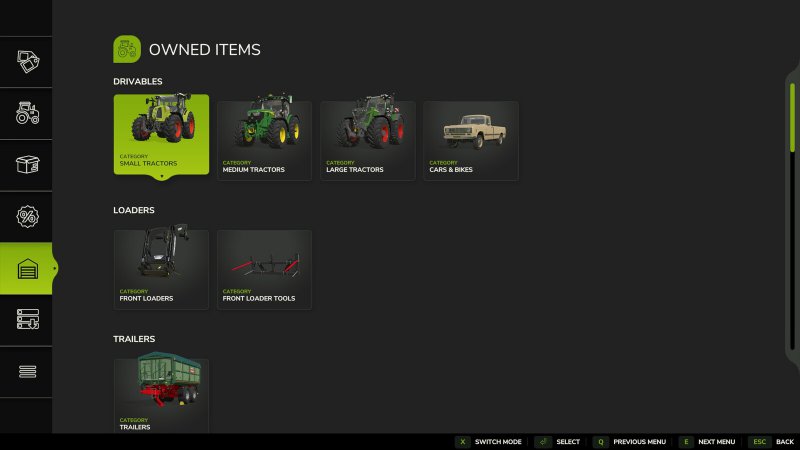
Galerie Beschreibung LS25 Garage Menu v1.0.0.4 Garage Menu Ein einfacher Menü, um Ihre von Ihnen besitzten und gepachteten Fahrzeuge zu betrachten, ähnlich wie in früheren Spielen. GitHub: https://github.com/sprkem/FS25_GarageMenu Änderungsliste: 1.0.0.4: – Zusätzliche Sicherheitsvorkehrung hinzugefügt, um Probleme mit bestimmten Mod-Gegenständen zu vermeiden. – Behebung der Zurück-/Weiter-Menüschaltflächen, die beim Klicken nicht funktionierten. 1.0.0.3: – Behebung der Unterstützung für Gebrauchte Ausrüstung kaufen. 1.0.0.2: – Sicherheitsvorkehrung hinzugefügt, um Probleme mit benutzerdefinierten Shop-Kategorien zu vermeiden, insbesondere bei Verwendung von FS25_TakeSingleObjects. 1.0.0.1: – Wenn Sie den Mod „Gebrauchte Ausrüstung kaufen“ verwenden, können Sie jetzt aktuell laufende Suchvorgänge im Garagenmenü sehen. Credits Ozz

Veröffentlicht: 23.04.2026

Downloads: 0Bewertungen: noch keine Stimmen.